10 Minute Email vs Permanent Email: When to Use Each Type
You're about to sign up for something online. The form asks for your email address. You pause and wonder: "Should I use my real email or a temporary one?"
This moment of hesitation reveals a fundamental question many people struggle with: When should you use temporary email, and when should you stick with permanent email?
The explosion of disposable email services has created a new dilemma. On one hand, 10 minute email addresses offer ultimate privacy and spam protection—they exist briefly, then vanish forever. On the other hand, permanent email addresses provide reliability, continuity, and long-term access to your communications.
Using the wrong type of email at the wrong time can lead to:
- Lost access to important accounts
- Missing critical communications
- Inability to recover passwords
- Spam overwhelming your inbox
- Privacy violations and tracking
- Wasted time managing email
But using the right email type at the right time gives you:
- Perfect balance of security and convenience
- Clean, organized inboxes
- Protected privacy without sacrifice
- Easy account management
- Peace of mind
In this comprehensive guide, you'll learn exactly when to use 10 minute email versus permanent email. You'll discover the strengths and limitations of each, practical decision frameworks, and real-world scenarios that show you the optimal choice every time.
Whether you're privacy-conscious, organization-focused, or simply tired of making the wrong email choice, this guide will transform how you approach online signups and communications.
Understanding the Email Spectrum
Before diving into when to use each type, let's understand what we're comparing.
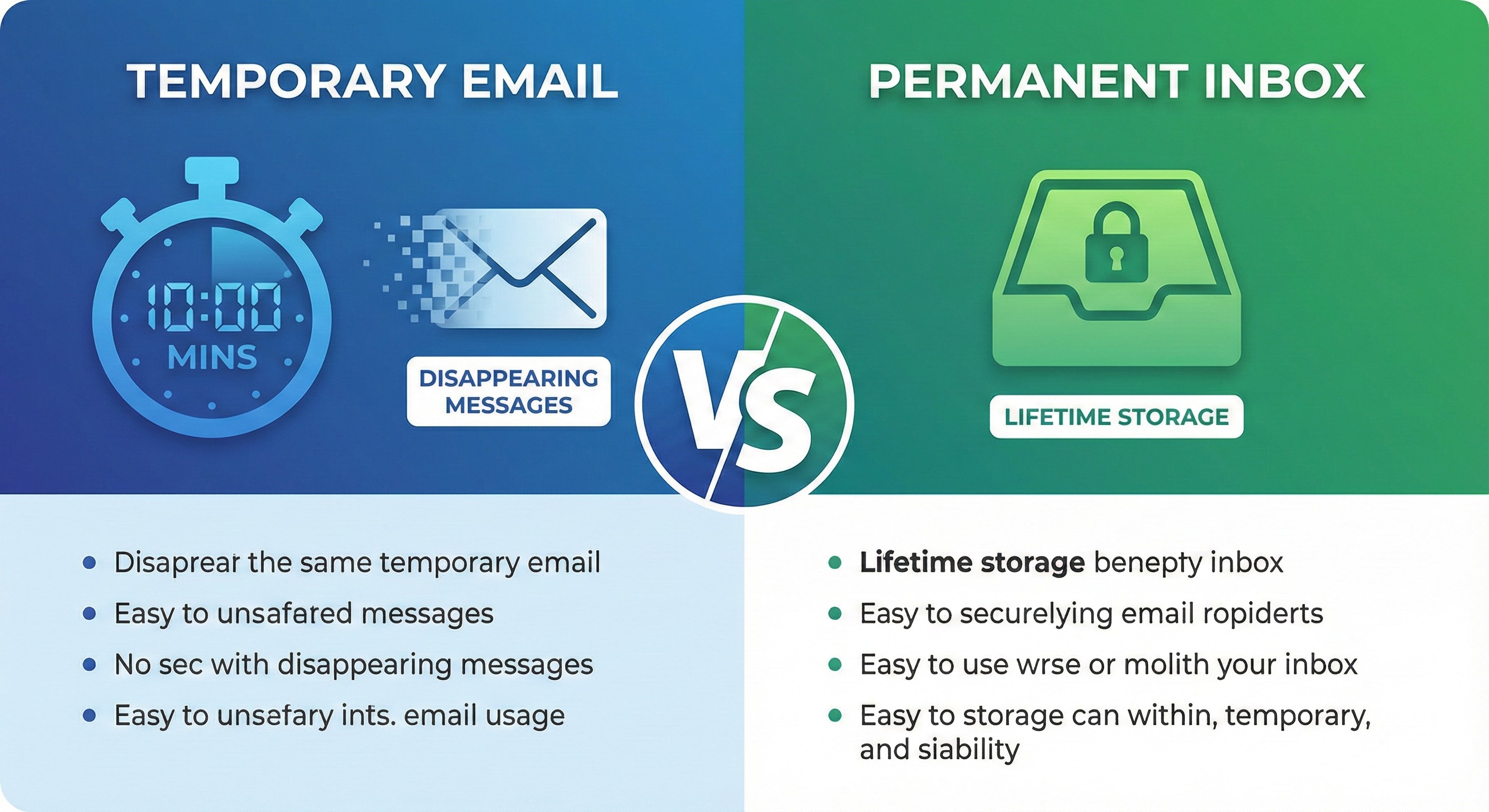
What Is 10 Minute Email?
Definition: A 10 minute email (also called ultra-short temporary email or flash email) is a disposable email address that:
- Exists for exactly 10 minutes (or similarly brief period)
- Receives emails during that window
- Automatically deletes after expiration
- Requires no registration or personal information
- Can be extended if needed (on some services)
- Leaves zero permanent trace
How It Works:
1. Visit temp mail service (like MailDitch)
2. 10-minute email generated instantly
3. Use it for immediate need (verification code, quick signup)
4. Check inbox during 10-minute window
5. Complete your task
6. Email expires automatically
7. All messages permanently deleted
8. Email address becomes inactive
Example:
Generated: [email protected]
Created: 2:00 PM
Active until: 2:10 PM
Purpose: Download PDF that requires email
Action: Receive download link, get PDF
Result: Email expires at 2:10 PM, all traces gone
What Is Permanent Email?
Definition: A permanent email address is a traditional email account that:
- Exists indefinitely (as long as you maintain it)
- Accumulates messages over time
- Requires registration and personal information
- Provides long-term reliable communication channel
- Offers features like folders, filters, search
- Serves as identity anchor across services
How It Works:
1. Sign up with email provider (Gmail, Outlook, etc.)
2. Provide personal information
3. Create password and security settings
4. Use for ongoing communications
5. Messages stored until you delete them
6. Account persists for years/decades
7. Serves as recovery method for other accounts
8. Permanent digital identity
Example:
Created: [email protected]
Established: January 2015
Active: 11+ years
Purpose: Primary personal and professional communications
Usage: Banking, work, family, important accounts
Result: Permanent, reliable, feature-rich email
The Email Type Spectrum
Ultra-Short (10 Minutes):
Duration: 10 minutes
Use: One-time immediate needs
Examples: Quick downloads, instant verifications
Privacy: Maximum
Convenience: High for brief tasks
Risk: Missing communications if too short
Short-Term (30 Minutes - 24 Hours):
Duration: Hours to 1 day
Use: Temporary signups, trials
Examples: Free trials, event registrations
Privacy: Very High
Convenience: Good for most temp needs
Risk: Forgetting to check before expiration
Medium-Term (1 Day - 1 Month):
Duration: Days to weeks
Use: Short-term projects, temporary services
Examples: Subscription trials, project communications
Privacy: High
Convenience: Balanced
Risk: Needing longer access than anticipated
Long-Term Temporary (1+ Months):
Duration: Months (with Premium service)
Use: Semi-permanent but segregated accounts
Examples: Separate shopping email, hobby accounts
Privacy: Medium-High
Convenience: High with premium features
Risk: Blurs line with permanent email
Permanent (Indefinite):
Duration: Years to lifetime
Use: Critical communications and identity
Examples: Banking, work, personal contacts
Privacy: Low (accumulated data)
Convenience: Maximum features and reliability
Risk: Spam accumulation, privacy exposure
The Case for 10 Minute Email
Let's explore when ultra-short temporary email is the perfect choice.
Advantages of 10 Minute Email
Advantage 1: Maximum Privacy Protection
The Benefit: Your email address exists so briefly that tracking becomes impossible.
How It Protects:
- Data brokers can't profile you (email gone before they act)
- Retailers can't add you to marketing lists
- Hackers can't steal what no longer exists
- No permanent digital footprint created
- Cross-platform tracking defeated
Real Impact: If a service you signed up for gets breached 2 weeks later, your 10-minute email is long gone—no exposure, no risk.
Advantage 2: Absolute Zero Spam
The Reality: Spam emails sent to expired 10-minute address bounce back to sender.
Result:
- Zero promotional emails reach you
- No "we miss you" campaigns
- No partner marketing
- No newsletter accumulation
- Your real inbox stays pristine
The Math:
Traditional email: 1 signup = 3.2 marketing emails/day = 96/month
10-minute email: 1 signup = 0 emails ever = Clean inbox
Advantage 3: Psychological Freedom
The Feeling: No commitment, no consequences, complete freedom to try things.
Use Cases:
- Test unknown services without risk
- Try products risk-free
- Explore new platforms
- Sign up for one-time access
- No "will I regret this?" hesitation
Mental Math:
Before: "Do I really want marketing emails from this company?"
With 10-min email: "I'll try it, email expires anyway"
Advantage 4: Forced Digital Minimalism
The Discipline: Can't accumulate digital clutter if email auto-deletes.
Benefits:
- No inbox hoarding
- Can't delay unsubscribing
- Automatic cleanup
- Fresh start guaranteed
- Impossible to procrastinate
The Contrast:
Permanent email: 47,000 unread emails, "I'll clean it someday"
10-minute email: Starts fresh every time, zero maintenance
Advantage 5: Perfect for Immediate Needs
The Fit: Some situations require email but only for seconds or minutes.
Ideal For:
- Receiving verification code RIGHT NOW
- Downloading file behind email gate
- Accessing gated content once
- Claiming one-time offer
- Quick account verification
Speed:
Generate 10-min email: 3 seconds
Use for verification: 30 seconds
Get what you need: 1 minute
Email expires: 10 minutes
Total time investment: Under 2 minutes
When 10 Minute Email Is Perfect
Scenario 1: One-Time Downloads
Situation: Website offers free ebook, template, or resource but requires email.
Why 10-Min Email:
- ✅ Only need download link once
- ✅ Don't want future marketing
- ✅ No ongoing relationship
- ✅ Immediate access sufficient
- ✅ Zero commitment desired
Example:
Need: Marketing template PDF
Solution: Generate 10-min email
Action: Enter email, receive download link
Result: Got template, email expired, no spam ever
Scenario 2: Quick Account Verifications
Situation: Creating account on platform you might not use long-term.
Why 10-Min Email:
- ✅ Testing platform before committing
- ✅ Verification code needed immediately
- ✅ Might not keep account
- ✅ Don't want spam if you abandon
- ✅ Easy to create fresh account later if needed
Example:
Testing: New social media platform
Solution: 10-minute email for signup
Action: Verify account, explore platform for hour
Decision: Not for me, abandon account
Result: No spam, no email trail
Scenario 3: Public Wi-Fi Access
Situation: Airport, coffee shop, or hotel requires email for Wi-Fi access.
Why 10-Min Email:
- ✅ Only need Wi-Fi for brief period
- ✅ Don't want location-based marketing
- ✅ Venue doesn't need real email
- ✅ Privacy from tracking
- ✅ No permanent record of location
Example:
Location: Airport Wi-Fi portal
Solution: 10-minute temp email
Action: Enter email, get Wi-Fi access
Usage: 2-hour layover
Result: Connected, email expired, no tracking trail
Scenario 4: Contest Entries
Situation: Online contest, sweepstakes, or giveaway entry.
Why 10-Min Email:
- ✅ Unlikely to win anyway
- ✅ Don't want sponsor marketing
- ✅ Receive entry confirmation quickly
- ✅ If you win, they'll contact other ways
- ✅ No spam from "partners"
Example:
Contest: Free product giveaway
Solution: 10-minute email for entry
Action: Submit entry, receive confirmation
Wait: Contest results in 2 weeks (they'll announce winners publicly)
Result: Didn't win, but also got zero spam emails
Scenario 5: Viewing Gated Content
Situation: Article, video, or content behind email wall.
Why 10-Min Email:
- ✅ Only want to read this one article
- ✅ No interest in future content
- ✅ Don't want publisher newsletters
- ✅ Quick access needed
- ✅ One-time viewing sufficient
Example:
Content: Industry report behind email gate
Solution: 10-minute temporary email
Action: Enter email, access report, read immediately
Value: Got information needed
Result: No newsletter subscription haunting you
Scenario 6: Testing Unknown Services
Situation: Want to try new app, platform, or service you know nothing about.
Why 10-Min Email:
- ✅ Might be scam or low quality
- ✅ Want to test before committing real email
- ✅ Easy to abandon if disappointing
- ✅ No consequences for trying
- ✅ Can always use real email later if good
Example:
Discovery: Interesting new productivity app
Solution: 10-minute email for trial signup
Action: Test features for 30 minutes
Evaluation: Not as good as current solution
Result: Abandoned guilt-free, no spam
The Case for Permanent Email
Now let's understand when traditional permanent email is the only right choice.
Advantages of Permanent Email
Advantage 1: Reliability and Longevity
The Guarantee: Your email exists as long as you maintain it—years, even decades.
Critical For:
- Long-term account access
- Password recovery reliability
- Consistent identity across platforms
- Historical communication records
- Trust-building with services
The Value:
2015: Create Gmail account
2026: Still accessing same account
11 years: All history preserved
Future: Will continue indefinitely
Advantage 2: Rich Features and Functionality
What Permanent Email Offers:
- Unlimited storage (often)
- Advanced search capabilities
- Folder and label organization
- Filters and automation
- Calendar integration
- Contact management
- Mobile app sync
- Multiple device access
- Attachment storage
- Conversation threading
What 10-Min Email Lacks:
- Most features impossible with brief lifespan
- No organization needed (everything deletes)
- Limited functionality by design
The Power: Permanent email is full communication platform, not just inbox.
Advantage 3: Professional Identity
The Reality: Some situations require professional, permanent email presence.
Essential For:
- Job applications
- Professional networking
- Business communications
- Client relationships
- Employer communications
- Professional certifications
- Industry associations
- Serious business
The Perception:
[email protected] = Professional, trustworthy
[email protected] = Questionable, anonymous
Advantage 4: Account Recovery and Security
The Safety Net: Permanent email serves as recovery method for dozens of accounts.
Critical Function:
- Password reset capability
- Two-factor authentication
- Security notification recipient
- Account verification
- Identity confirmation
- Emergency access
The Risk of Temp Email:
Scenario: Forget password on important account
Temp email: Expired, can't recover password
Permanent email: Receive reset link, regain access
Advantage 5: Legal and Financial Requirements
The Necessity: Many critical services legally or practically require permanent email.
Mandatory For:
- Banking institutions
- Government services
- Healthcare providers
- Legal proceedings
- Tax services
- Insurance companies
- Financial advisors
- Real estate transactions
Why:
- Regulatory compliance
- Legal record-keeping
- Audit trails
- Identity verification
- Long-term relationship expectation
When Permanent Email Is Essential
Scenario 1: Banking and Financial Services
Why Permanent Required:
- ✅ Need reliable long-term access
- ✅ Security notifications critical
- ✅ Transaction confirmations important
- ✅ Password recovery essential
- ✅ Regulatory requirements
- ✅ Fraud alert delivery
- ✅ Statement delivery
- ✅ Tax document access
Example:
Opening: Bank account, investment account, credit card
Required: Verified permanent email address
Communications: Monthly statements, security alerts, transaction notices
Duration: Years to decades
Risk: Missing critical fraud alert if email expired
Never Use 10-Min Email For:
- ❌ Bank accounts
- ❌ Investment platforms
- ❌ Credit cards
- ❌ Payment processors
- ❌ Cryptocurrency exchanges
- ❌ Loan applications
- ❌ Mortgage services
- ❌ Insurance policies
Scenario 2: Healthcare Services
Why Permanent Required:
- ✅ Medical records access
- ✅ Appointment reminders
- ✅ Test results delivery
- ✅ Prescription notifications
- ✅ HIPAA compliance
- ✅ Emergency contacts
- ✅ Telehealth access
- ✅ Insurance coordination
Example:
Service: Primary care physician portal
Email: Permanent verified address
Usage: Appointment scheduling, test results, prescription refills
Importance: Health-critical communications
Duration: Lifetime relationship
Never Use 10-Min Email For:
- ❌ Doctor's offices
- ❌ Hospital portals
- ❌ Pharmacy services
- ❌ Health insurance
- ❌ Telehealth platforms
- ❌ Medical labs
- ❌ Mental health services
- ❌ Dental offices
Scenario 3: Employment and Professional
Why Permanent Required:
- ✅ Job application tracking
- ✅ Interview scheduling
- ✅ Offer letters
- ✅ Company communications
- ✅ Payroll notifications
- ✅ Benefits information
- ✅ Professional reputation
- ✅ Career continuity
Example:
Situation: Job search and employment
Email: Professional permanent address
Communications: Applications, interviews, offers, work assignments
Professional image: [email protected] or [email protected]
Duration: Career span
Never Use 10-Min Email For:
- ❌ Job applications
- ❌ LinkedIn profile
- ❌ Professional networking
- ❌ Company email (obviously)
- ❌ Client communications
- ❌ Business partnerships
- ❌ Professional certifications
- ❌ Industry memberships
Scenario 4: Education and Academic
Why Permanent Required:
- ✅ Student portal access
- ✅ Grade notifications
- ✅ Assignment submissions
- ✅ Financial aid communications
- ✅ Transcript requests
- ✅ Graduation information
- ✅ Alumni networking
- ✅ Certification verification
Example:
Context: University enrollment
Email: Student permanent email (often provided by school)
Purpose: Academic communications, records, resources
Duration: Education period + alumni status
Critical: Can't lose access to transcripts or certifications
Never Use 10-Min Email For:
- ❌ University portals
- ❌ Online course platforms
- ❌ Student information systems
- ❌ Financial aid applications
- ❌ Scholarship applications
- ❌ Academic journals
- ❌ Research platforms
- ❌ Educational certifications
Scenario 5: Government Services
Why Permanent Required:
- ✅ Legal requirements
- ✅ Official communications
- ✅ Document delivery
- ✅ Service access
- ✅ Compliance tracking
- ✅ Identity verification
- ✅ Benefit eligibility
- ✅ Long-term records
Example:
Services: IRS, Social Security, DMV, voter registration
Email: Verified permanent address
Importance: Legal and civic obligations
Communications: Tax documents, official notices, benefits
Duration: Lifetime
Never Use 10-Min Email For:
- ❌ Tax services (IRS)
- ❌ Social security
- ❌ DMV/licensing
- ❌ Voter registration
- ❌ Government benefits
- ❌ Passport services
- ❌ Legal proceedings
- ❌ Official permits
The Middle Ground: Extended Temporary Email
Sometimes you need something between 10 minutes and forever.
Understanding Extended Temporary Email
Definition: Temporary email with flexible duration—hours, days, weeks, or months—but still disposable.
How It Works:
Service: MailDitch Premium
Generated: Extended temp email
Duration: You choose (1 hour to unlimited)
Features: Full inbox functionality
Usage: Longer-term but still temporary needs
Expiration: You decide when to burn
Benefits:
- Flexibility of temporary
- Reliability of permanent (while active)
- Privacy protection
- Spam isolation
- Easy abandonment when done
When Extended Temp Email Is Perfect
Scenario 1: Free Trial Periods
Situation: 7-day, 14-day, or 30-day free trial signup.
Solution:
Trial length: 14 days
Email duration: 20 days (trial + buffer)
Purpose: Receive trial communications
Advantage: Marketing stops when email expires
Result: Tried service, decided not to keep, no spam aftermath
Why Extended:
- ✅ Too long for 10-minute email
- ✅ Don't want permanent email marketing
- ✅ Need access for trial duration
- ✅ Easy to abandon if don't convert
- ✅ Perfect temporary solution
Scenario 2: Short-Term Projects
Situation: 3-month freelance project requiring dedicated email.
Solution:
Project: Freelance design work
Email: [email protected]
Duration: 90 days (project length)
Usage: Client communications, file sharing
Completion: Burn email after project and payment complete
Why Extended:
- ✅ Professional appearance
- ✅ Separated from personal email
- ✅ Can abandon after project
- ✅ Client emails don't clutter main inbox
- ✅ Clean termination
Scenario 3: Event Registration
Situation: Conference, workshop, or event in 2 months.
Solution:
Event: Industry conference June 2026
Email: [email protected]
Duration: 90 days (registration through event + follow-up)
Usage: Confirmation, updates, networking
Post-event: Burn email, no vendor spam
Why Extended:
- ✅ Need updates leading up to event
- ✅ Event day communications
- ✅ Post-event networking brief window
- ✅ Then dispose completely
- ✅ No permanent vendor relationship
Scenario 4: Seasonal Shopping
Situation: Holiday shopping season at multiple retailers.
Solution:
Season: November-December holiday shopping
Email: [email protected]
Retailers: 10-15 different stores
Duration: 60 days (shopping + delivery + returns)
Post-season: Burn email January 1st
Why Extended:
- ✅ Order confirmations needed
- ✅ Shipping notifications important
- ✅ Return window coverage
- ✅ Marketing contained to temp email
- ✅ Clean slate after holidays
Scenario 5: Apartment Hunting
Situation: Looking for new apartment, 30-60 day search period.
Solution:
Purpose: Apartment search
Email: [email protected]
Duration: 60 days (search + lease signing)
Usage: Listings, landlord contact, applications
Completion: Burn after moving in
Why Extended:
- ✅ Need for search duration
- ✅ Multiple landlord communications
- ✅ Application follow-ups
- ✅ Don't want permanent marketing
- ✅ Clean end after finding place
Decision Framework: Which Email Type to Use?
Use this framework to decide in any situation:
The Four-Question Method
Question 1: How Long Do I Need This Email?
< 1 hour → 10-minute email
1-24 hours → Short-term temp (extend 10-min if needed)
1-7 days → Extended temp email
1 week - 3 months → Extended temp email (Premium)
3+ months → Consider permanent or long-term Premium temp
Indefinite → Permanent email required
Question 2: Is This Critical to My Life/Finances/Health?
Yes, critical → Permanent email ONLY
Might become critical → Permanent email safer
Low importance → Temporary email fine
Zero importance → 10-minute email perfect
Critical Areas:
- Banking, finance, money
- Healthcare, medical, wellness
- Legal, government, official
- Employment, career, income
- Education, degrees, certifications
- Housing, utilities, essentials
Question 3: Will I Need Password Recovery?
Yes, must recover passwords → Permanent email
Might need recovery → Permanent or long-term temp (Premium)
Account not important → Temporary email OK
Don't care if lose access → 10-minute email fine
Consider:
- Value of account
- Difficulty replacing account
- Data stored in account
- Consequences of lockout
Question 4: Do I Want Future Communications?
Yes, want updates → Permanent email
Maybe, not sure yet → Extended temp (easy to forward valuable emails)
No, one-time only → 10-minute email
Absolutely not → 10-minute email perfect
Communication Types:
- Order confirmations: Maybe need
- Shipping updates: Temporarily need
- Marketing emails: Never want
- Product updates: Depends on product
- Account notifications: Depends on importance
Quick Reference Decision Chart
PERMANENT EMAIL USE FOR:
✅ Banking, financial, money-related
✅ Healthcare, medical, insurance
✅ Government, legal, official
✅ Employment, career, professional
✅ Education, degrees, certifications
✅ Primary social media accounts
✅ Important subscriptions (paid services you value)
✅ Family, friends, trusted contacts
✅ Long-term commitments
✅ Anything critical to life

EXTENDED TEMP EMAIL (Premium) USE FOR:
✅ Free trials (7-30 days)
✅ Short-term projects (weeks to months)
✅ Seasonal activities (holiday shopping)
✅ Event registrations
✅ Temporary services
✅ Testing before committing
✅ Medium-priority signups
✅ Separated activities (hobby accounts)

10-MINUTE EMAIL USE FOR:
✅ One-time downloads
✅ Quick verifications
✅ Unknown/untrusted services
✅ Public Wi-Fi access
✅ Gated content viewing
✅ Contest entries
✅ Testing something briefly
✅ Anything you'll abandon immediately
✅ Maximum privacy needs
✅ Zero commitment desired
Real-World Scenarios: Making the Right Choice
Let's apply the framework to real situations:
Scenario 1: Signing Up for Netflix
Analysis:
Duration: Ongoing subscription (months/years)
Critical: No (entertainment only)
Recovery: Yes (paid subscription, want access)
Communications: Yes (billing, recommendations)
Decision: Permanent Email (or secondary permanent email)
Reasoning:
- Long-term subscription
- Paid service (want to maintain access)
- Need password recovery
- Billing notifications important
- Not ultra-critical but want reliability
Alternative: Create secondary permanent email just for entertainment subscriptions (Netflix, Spotify, etc.) to keep separated from primary email but maintain access.
Scenario 2: Downloading Free Marketing Template
Analysis:
Duration: Need download link for 5 minutes
Critical: No (free resource)
Recovery: No (can find similar elsewhere)
Communications: No (don't want marketing)
Decision: 10-Minute Email
Reasoning:
- Only need download link once
- Not critical resource
- Don't want marketing emails
- Can't think of reason to use permanent email
- Perfect use case for ultra-short temp
Scenario 3: Registering for Professional Conference
Analysis:
Duration: 3 months (registration through event + 2 weeks after)
Critical: Somewhat (professional development)
Recovery: Maybe (registration confirmation important)
Communications: Yes (event updates, schedule changes)
Decision: Extended Temp Email (Premium)
Reasoning:
- Need for months leading to event
- Important updates required
- Professional but temporary
- Don't want ongoing vendor marketing
- Can burn after event concludes
Setup:
Email: [email protected]
Duration: 90 days
Features: Premium for reliability
Purpose: Event communications only
Expiration: April 30, 2026 (after event + follow-up)
Scenario 4: Opening Retirement Investment Account
Analysis:
Duration: Decades (lifetime investment)
Critical: YES (financial, retirement, critical)
Recovery: ESSENTIAL (cannot lose access)
Communications: Critical (statements, alerts, important notifications)
Decision: Permanent Email ONLY
Reasoning:
- Lifetime importance
- Financial criticality
- Legal requirements
- Must have reliable access
- Security notifications essential
- No alternative acceptable
Best Practice: Use primary permanent email or dedicated financial email (also permanent).
Scenario 5: Trying New Productivity App
Analysis:
Duration: Unknown (testing phase)
Critical: No (can switch apps)
Recovery: Would be nice but not essential
Communications: Don't want marketing yet
Decision: 10-Minute Email First, Upgrade If Valuable
Strategy:
Phase 1: Test with 10-minute email
  - Try features for 30 minutes
  - Evaluate if worth keeping
Phase 2: If good, create new account with permanent email
  - Migrate data if possible
  - Or continue with extended temp (Premium) if prefer separation
Phase 3: If bad, abandon
  - 10-minute email expires
  - No consequences
Reasoning:
- Start with minimum commitment
- No risk in trying
- Can always upgrade later
- Avoid spam if not valuable
Scenario 6: Signing Up for Gym Membership
Analysis:
Duration: 6-12 months (typical membership)
Critical: Somewhat (paid service, health)
Recovery: Yes (billing, class schedules)
Communications: Yes (class updates, billing)
Decision: Permanent Email (or permanent secondary)
Reasoning:
- Multi-month commitment
- Paid membership
- Need billing notifications
- Class schedule changes important
- Too long for temp email
- Recovery needed for membership portal
Alternative: Secondary permanent email for all health/fitness services to separate from primary but maintain reliability.
Scenario 7: Entering Online Sweepstakes
Analysis:
Duration: Entry confirmation only (seconds)
Critical: No (unlikely to win)
Recovery: No (don't care)
Communications: NO (definitely don't want sponsor spam)
Decision: 10-Minute Email
Reasoning:
- Only need entry confirmation
- Will probably lose anyway
- If win, they announce publicly
- Don't want marketing emails
- Zero commitment
- Perfect temporary use
Advanced Strategies: Hybrid Approaches
Sophisticated email users combine different types strategically:
Strategy 1: The Email Tier System
Tier 1: Primary Permanent
Address: [email protected]
Use: Critical life functions only
Services: Bank, healthcare, government, primary employer
Protection: Maximum security, careful sharing
Tier 2: Secondary Permanent
Address: [email protected]
Use: Regular but non-critical services
Services: Streaming, shopping, social media, gaming
Protection: Moderate security, selective sharing
Tier 3: Extended Temporary (Premium)
Address: [email protected]
Use: Short-to-medium term needs
Services: Trials, projects, seasonal, testing
Protection: Disposable, clean termination
Tier 4: 10-Minute Temporary
Address: [email protected]
Use: Instant, ultra-short needs
Services: Downloads, quick verifications, unknowns
Protection: Maximum privacy, zero trace
Implementation:
Decision tree:
1. Is it critical? → Tier 1
2. Will I use regularly? → Tier 2
3. Temporary but need access? → Tier 3
4. One-time immediate? → Tier 4
Strategy 2: The Progressive Email Escalation
Concept: Start with most temporary, escalate only if needed.
Process:
Step 1: Try with 10-minute email
  - Test service/feature
  - Evaluate value
  - No commitment

Step 2: If valuable, escalate to extended temp
  - Create new account with Premium temp email
  - Use for trial period
  - Still disposable

Step 3: If becomes essential, escalate to permanent
  - Migrate to secondary permanent email
  - Now reliable long-term
  - Full commitment

Step 4: If truly critical, move to primary
  - Update to primary permanent email
  - Maximum importance
  - Critical function
Benefits:
- Start with minimum commitment
- Escalate only when proven valuable
- Avoid premature permanent email sharing
- Maintain privacy by default
Example:
Discovery: New project management tool
Week 1: Test with 10-minute email → Like it!
Week 2: Create account with extended temp → Using daily!
Month 2: Upgrade to secondary permanent → Essential tool!
Month 6: Migrate to primary email → Critical to work!
Strategy 3: The Purpose-Specific Email System
Concept: Different extended temp emails for different life areas.
Implementation:
Shopping: [email protected]
  - All e-commerce
  - Burn quarterly, fresh start

Social Media: [email protected]
  - Alternative social accounts
  - Pseudonymous presence

Projects: [email protected]
  - Freelance/side projects
  - Burn after completion

Testing: [email protected]
  - Try new services
  - Burn monthly

Events: [email protected]
  - Conferences, meetups, workshops
  - Burn after event season
Benefits:
- Organization by category
- Controlled spam (contained per category)
- Easy to burn entire category when done
- Clear purpose for each email
Strategy 4: The Seasonal Rotation
Concept: Rotate extended temp emails seasonally.
Schedule:
Q1 (Jan-Mar): [email protected]
Q2 (Apr-Jun): [email protected]
Q3 (Jul-Sep): [email protected]
Q4 (Oct-Dec): [email protected]
Process:
Start of quarter:
1. Generate new seasonal temp email
2. Use for all signups this quarter
3. End of quarter: Review what's worth keeping
4. Migrate important to permanent or next quarter
5. Burn old seasonal email
6. Fresh start next quarter
Benefits:
- Regular cleaning cycles
- Limited spam accumulation windows
- Natural review periods
- Forced evaluation of services
Common Mistakes and How to Avoid Them
Learn from these frequent errors:
Mistake 1: Using 10-Minute Email for Important Accounts
The Error:
Service: Banking app
Email: [email protected] (10-minute)
Problem: Email expires, can't recover password
Result: Locked out of bank account permanently
The Fix: Always use permanent email for critical services. No exceptions.
Mistake 2: Using Permanent Email for Everything
The Error:
Primary email: Used for 500+ services
Result: 200+ spam emails daily
Reality: Can't find important messages
Problem: Privacy completely compromised
The Fix: Use email tiers. Permanent only for critical, temporary for most others.
Mistake 3: Forgetting to Check Extended Temp Before Expiration
The Error:
Extended temp: 7-day trial email
Day 8: Email expired
Day 9: Realized I wanted to keep service
Problem: Can't access account, verification emails gone
The Fix:
- Set reminders before expiration
- Use MailDitch Premium to save critical emails
- Screenshot important confirmations
- Migrate to permanent if deciding to keep
Mistake 4: Not Documenting Which Email Used Where
The Error:
Created: 5 different extended temp emails
Problem: Which email for which service?
Result: Can't remember, can't access accounts
The Fix:
Use password manager:
- Document temp email with each account
- Note expiration date
- Add purpose/notes
- Track in one place
Mistake 5: Trying to Use 10-Min Email for Slow Verifications
The Error:
Service: Sends verification email in 30 minutes
Email: 10-minute temp
Result: Email expired before verification arrived
Problem: Can't verify, can't create account
The Fix:
- Extend time if service offers
- Use extended temp (30+ minutes) for slower services
- Or use permanent for services with slow verification
Measuring Success: Are You Using the Right Email Types?
Success Indicators
Indicator 1: Inbox Cleanliness
✅ Primary email: Only critical communications
✅ Less than 20 emails/day in primary
✅ 80%+ of emails are actually important
✅ Can find any email in under 30 seconds
✅ Inbox zero achievable regularly
Indicator 2: Security Confidence
✅ Critical accounts use permanent email
✅ Never worried about losing access
✅ Password recovery always works
✅ No accounts locked out
✅ Security notifications always received
Indicator 3: Privacy Protection
✅ Real email not given to untrusted services
✅ Spam dramatically reduced
✅ Marketing contained or eliminated
✅ Cross-platform tracking broken
✅ Digital footprint minimized
Indicator 4: Flexibility and Freedom
✅ Can try new services without consequence
✅ Easy to abandon unsatisfactory services
✅ No guilt about burning temp emails
✅ Fresh starts anytime desired
✅ No accumulated digital clutter
Indicator 5: Appropriate Commitment
✅ Email type matches service importance
✅ Never over-committed with permanent email
✅ Never under-committed with too-short temp
✅ Right tool for right job every time
✅ Satisfied with all email decisions
Conclusion: Master the Art of Email Type Selection
The difference between a 10-minute email and a permanent email isn't just about duration—it's about matching the tool to the task, balancing privacy with reliability, and making conscious choices about your digital commitments.
What you've learned:
✅ The full spectrum of email types and their characteristics
✅ When a 10-minute email is perfect and when it's dangerous
✅ When a permanent email is essential and when it's overkill
✅ The power of an extended temporary email as a middle ground
✅ Decision frameworks for any situation
✅ Real-world scenarios with optimal choices
✅ Advanced hybrid strategies for sophisticated users
✅ Common mistakes and how to avoid them
Key takeaways:
- Match email type to importance - Critical services get a permanent email, trivial gets a 10-minute email
- Start temporary, escalate if needed - Begin with the least commitment, upgrade only when proven valuable
- Use tiers and categories - Organize with primary permanent, secondary permanent, extended temp, and ultra-short temp
- Extended temp is underused - MailDitch Premium bridges the gap between 10-minute and permanent perfectly
- Document everything - Track which email was used where to avoid confusion
- Review regularly - Burn what's no longer needed, keep what's valuable
- Never compromise on critical - Banking, health, legal, always get a permanent email
Your optimal email strategy:
- Visit https://mailditch.com
- Usea 10-minute email for immediate, trivial needs
- Use extended temp (Premium) for short-to-medium term
- Reserve permanent email for truly critical services
- Apply decision framework to every signup
Stop using one email type for everything. Start making conscious, strategic choices about which email to use when. Your inbox, privacy, and sanity will thank you.
👉 Get Your Temporary Email Now - From 10 minutes to indefinite, choose the right type every time.
The right email type for every situation. Master the choice.
Related Articles
- How to Protect Your Real Email from Spam and Phishing Attacks
- The Ultimate Guide to Free Temporary Email for Verification
- Stay Anonymous Online with Instant Email Address No Registration
- Stop Spam Forever: How Burner Mail Service Protects Your Inbox
Choose the Right Email Type
Quick Links:
About This Guide: Created by MailDitch team to help users understand when to use different email types for maximum privacy and convenience.
Last Updated: January 2026
Share this guide with anyone confused about email types. Help them make better choices.
Questions about choosing email types? Comment below and we'll help you decide!