The Ultimate Guide to Free Temporary Email for Verification in 2026
Email verification is everywhere. Whether you're signing up for a new app, downloading a free resource, accessing exclusive content, or creating an online account, you're constantly asked to verify your email address. But here's the problem: using your real email for every verification request exposes you to spam, data breaches, and privacy violations.
Enter the solution: free temporary email for verification—a powerful tool that lets you verify accounts, receive confirmation codes, and access services without compromising your personal inbox.
This ultimate guide will teach you everything you need to know about temporary email addresses, from basic concepts to advanced strategies. By the end, you'll be a temp mail master, protecting your privacy while enjoying full access to the internet.
What is Temporary Email and Why Should You Use It?
Let's start with the fundamentals.a
Temporary email (also called a disposable email, temp mail, burner email, or throwaway email) is a short-lived email address that allows you to receive messages without using your personal email. These addresses are typically valid for anywhere from 10 minutes to several days, after which they—and all messages received—are automatically deleted.
Think of it as a digital alias that shields your real identity.
Why You Need a Temporary Email for Verification:
- Privacy Protection: Your real email is connected to your identity, financial accounts, and personal information. Every time you use it for verification, you're creating a digital trail. Temporary email breaks this connection, keeping your real inbox anonymous.
- Spam Prevention: Studies show that 67% of websites share email addresses with third-party marketers. Within weeks of signing up, your inbox can be flooded with promotional emails, newsletters, and outright spam. Disposable email addresses eliminate this problem entirely.
- Security Against Breaches: In 2025 alone, over 2,000 data breaches exposed billions of email addresses. When you use a temporary email address for verification, even if that service gets hacked, your real email remains safe and untouched.
- Quick Access Without Commitment: Sometimes you need to access content behind an email gate, try a service, or claim a one-time offer. Temporary email gives you instant access without the long-term commitment of newsletter subscriptions or marketing campaigns.
- Testing and Development: Developers and QA testers use temporary email for verification when testing signup flows, email notifications, and user journeys—without cluttering real inboxes or creating fake accounts.
- Multiple Accounts: Need several accounts on the same platform? Disposable email addresses make this effortless without juggling multiple real email addresses or violating terms of service.
The bottom line: free temporary email for verification is your passport to a safer, spam-free digital experience.
How Free Temporary Email for Verification Works
Understanding the mechanics of temporary mail helps you use it more effectively. Here's what happens behind the scenes:
Step 1: Address Generation
When you visit a temporary email service like MailDitch, the system instantly generates a random email address for you. This address typically consists of:
- A random username (letters, numbers, or a combination)
- An @ symbol
- A domain provided by the service (e.g., @ditch.my.id)
Example: [email protected]
The best part? This entire process happens in seconds with instant email address no registration required. No forms to fill out, no personal information needed, no passwords to remember.
Step 2: Email Reception
Your temporary inbox is now active and ready to receive messages. When someone sends an email to your disposable address:
- The message arrives at the temporary mail server
- The system routes it to your specific inbox
- You see it appear in real-time (no refresh needed on services like MailDitch)
- You can read the message, click links, and download attachments
The experience is nearly identical to using a regular email inbox, except everything happens anonymously and temporarily.
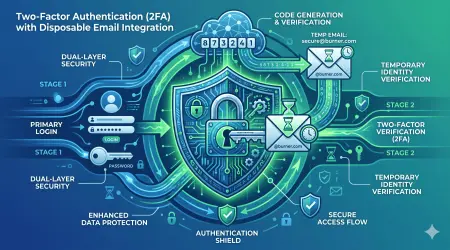
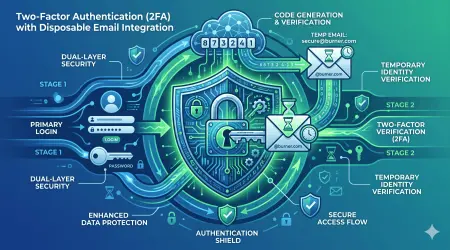
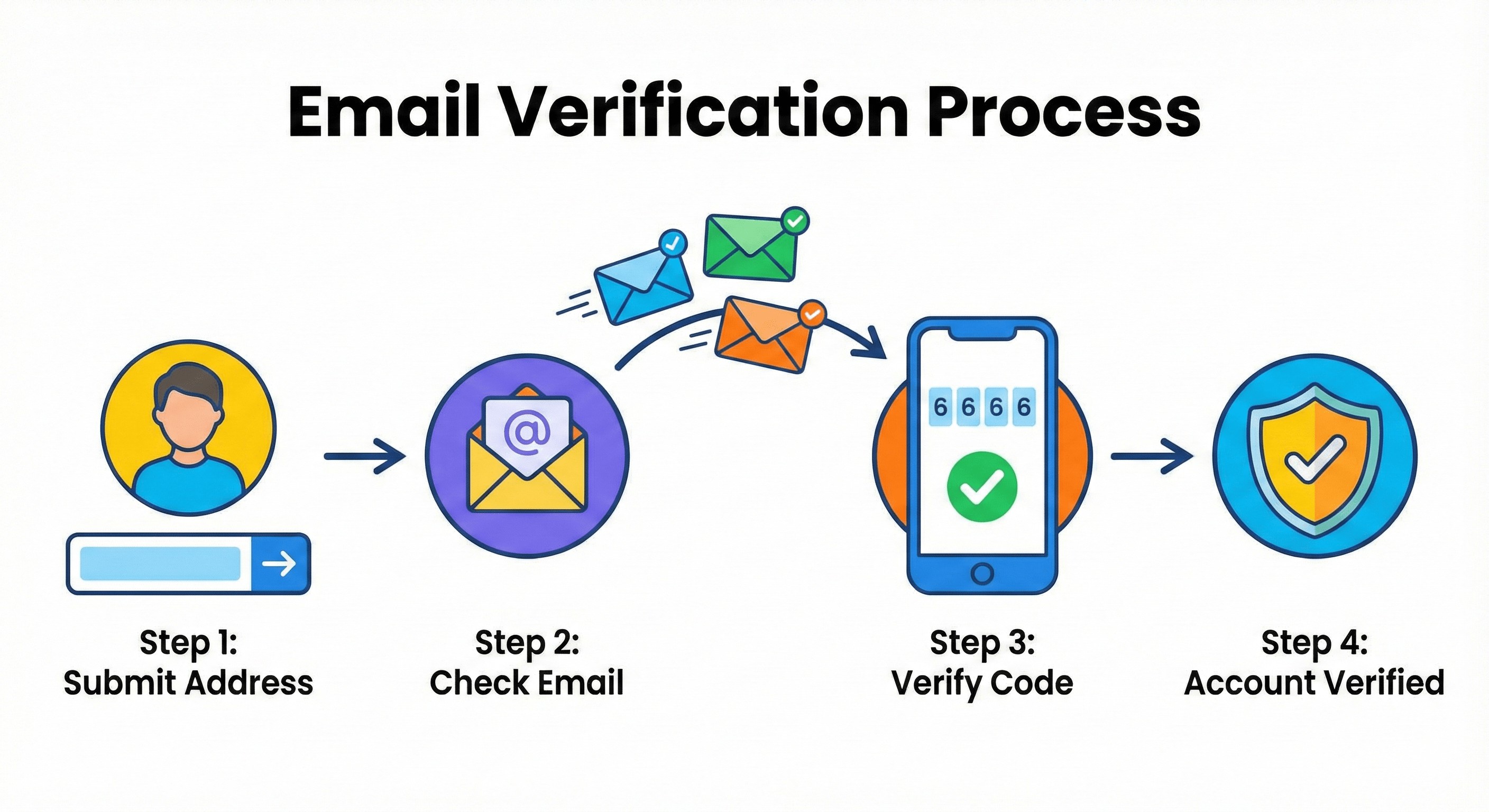
Step 3: Verification Process
Here's where the magic happens for verification purposes:
- You enter your temporary email address on a website's signup form
- The website sends a verification email (confirmation link or code)
- You check your temporary inbox and see the verification message
- You click the confirmation link or copy the verification code
- You return to the website and complete the verification
- Account verified—without exposing your real email!
Step 4: Automatic Deletion
After a predetermined time period (which you can often customize), your temporary email and all received messages are automatically and permanently deleted from the server. This ensures:
- Zero digital footprint
- No accumulated spam
- Complete privacy protection
- No manual cleanup required
It's like the email never existed—because soon enough, it won't.
Step-by-Step: Creating Your First Temporary Email for Verification
Ready to start using disposable email addresses? Follow this beginner-friendly tutorial:
Getting Started with MailDitch (Example)
Step 1: Visit the Service
Go to https://mailditch.com. No download, no app installation, no registration—just open the website.
Step 2: Get Your Instant Email Address
The moment the page loads, you'll see a randomly generated temporary email address displayed prominently. This is your disposable email address, ready to use immediately.
Example display: [email protected]
Step 3: Copy Your Temporary Address
Click the "Copy" button or manually select and copy the entire email address. This is what you'll paste into verification forms.
Pro Tip: If you don't like the generated address, click "Refresh" or "Change" to generate a new random address. Keep refreshing until you get one you're comfortable using.
Step 4: Use It for Verification
Now comes the practical application:
- Go to the website where you need to verify your email
- Find the "Email" or "Email Address" field in the signup form
- Paste your temporary email address
- Complete the rest of the signup form (username, password, etc.)
- Click "Sign Up," "Register," or "Create Account"
Step 5: Receive the Verification Email
Switch back to your MailDitch tab or window. Within seconds (usually 2-10 seconds), the verification email will appear in your temporary inbox. You'll see:
- Sender name and email
- Subject line
- Preview of the message
- Time received
Step 6: Complete Verification
Click on the email to open it fully. You'll typically see one of two verification methods:
Method A: Verification Link
- Click the "Verify Email" or "Confirm Account" button/link
- A new tab opens with the website
- Verification is automatically completed
- You can now log in to your new account
Method B: Verification Code
- Copy the numeric or alphanumeric code from the email
- Return to the website (usually still open in another tab)
- Paste the code into the "Verification Code" field
- Click "Verify" or "Confirm"
- Account activated!
Step 7: Use Your Account
You're now verified and can access the service, content, or features you signed up for—all without exposing your real email to spam or data collection.
Step 8: Let It Expire (or Not)
For basic use cases, simply close the MailDitch tab and forget about it. Your temporary email will automatically delete after its expiration time.
For longer-term use:
- Keep the tab open to maintain access
- Bookmark the inbox URL if you need to return later
- Upgrade to a premium account to save important emails
- Add the email to your history for future reference
That's it! You've successfully used free temporary email for verification without compromising your privacy.
Common Use Cases: When to Use Temporary Email for Verification
Disposable email addresses aren't just for paranoid tech enthusiasts—they're practical tools for everyday internet users. Here are the most common scenarios where temporary mail makes perfect sense:
1. Free Trial Signups
Many services offer free trials that require email verification. The problem? Most trials automatically convert to paid subscriptions, and your email gets added to marketing lists.
Solution: Use a temporary email address for the trial signup. Get the verification code, activate your trial, and use the service. When the trial ends, simply abandon the disposable email. No subscription reminders, no marketing emails, clean inbox.
Best for: Software trials, streaming service free months, premium feature trials, fitness app trials
2. One-Time Downloads and Resources
Downloading an ebook, whitepaper, template, or software often requires email verification. You want the resource, not a lifetime subscription to their newsletter.
Solution: Enter your temporary email, receive the download link via verification email, grab your file, and move on. No unsubscribing necessary because you never subscribed with your real email.
Best for: PDF downloads, templates, free courses, gated content, research papers, software installers
3. Public Wi-Fi Access
Airports, cafes, hotels, and public spaces often require email verification to access their Wi-Fi networks. Using your real email means they can track your location patterns and send location-based marketing.
Solution: Use a disposable email address for Wi-Fi verification. Get online quickly and anonymously without creating a profile in their marketing database.
Best for: Airport Wi-Fi, hotel internet, cafe networks, public library access
4. Contest and Giveaway Entries
Want to enter that raffle or online contest? Be prepared for your email to be sold to marketing companies and bombarded with "partner offers."
Solution: Enter contests using temporary email addresses. If you win, you'll receive the notification in your temp inbox. If you don't win, no harm done—no spam follows you.
Best for: Online sweepstakes, product giveaways, prize draws, promotional contests
5. Forum and Community Registrations
Online forums, discussion boards, and community platforms require email verification to reduce spam accounts. But forum databases are frequent targets for hackers.
Solution: Use a disposable email for forum signups. Verify your account, participate in discussions, and if the forum gets hacked, your real email isn't exposed.
Best for: Gaming forums, hobby communities, tech support forums, fan communities, Reddit-style platforms
6. Newsletter Subscriptions (Testing)
Curious about a newsletter but not sure if you want a long-term commitment? Or need to access "email-only" content?
Solution: Subscribe with a temporary email, receive the welcome email and first few editions, and evaluate the content quality. If it's valuable, re-subscribe with your real email. If not, the disposable address expires without cluttering your inbox.
Best for: Newsletter sampling, email courses, weekly digests, promotional alerts
7. E-commerce Account Creation
Shopping sites want your email for order confirmations and promotions. But using your real email means years of marketing emails.
Solution: For one-time purchases or stores you're unlikely to use again, create an account with a temporary email. Use it for order verification, then abandon it. For stores you'll use repeatedly, consider a secondary real email dedicated to shopping.
Best for: One-time purchases, international shopping, marketplace sellers, seasonal sales
8. App and Game Signups
Mobile apps and online games require email verification to create accounts and enable features like cloud saves or multiplayer.
Solution: For apps you're just testing or games you might not stick with, use a temporary email for verification. If you end up loving the app, you can later add a permanent email in settings.
Best for: Mobile game trials, app testing, beta versions, casual gaming
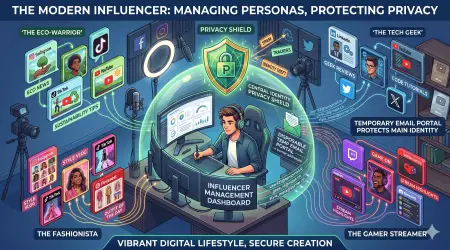
9. Social Media Alternative Accounts
Need a second Instagram for your pet? A Twitter account for your hobby? A LinkedIn profile for freelancing?
Solution: While your main social media should use your real email, alternative or anonymous accounts benefit from disposable email addresses for verification—especially if you want to keep them separate from your primary identity.
Best for: Anonymous accounts, hobby-specific profiles, professional separate personas, testing accounts
10. Website Testing and Development
Developers and testers need to create multiple accounts to test features, verify emails work correctly, and ensure user flows function properly.
Solution: Temporary email generators provide unlimited disposable addresses for testing without creating fake accounts with personal emails or maintaining test email servers.
Best for: QA testing, development testing, user flow verification, email template testing
Advanced Tips for Power Users
Ready to level up your temporary email game? These advanced strategies will maximize your privacy and efficiency:
Tip 1: Use Different Domains for Different Purposes
Services like MailDitch offer multiple email domains. Take advantage of this by organizing your disposable addresses:
- Use
@ditch.my.idfor shopping sites - Use
@masked.my.idfor social media - Use
@priva.my.idfor forums
This mental organization helps you track which services got which temporary address, useful if you need to return later.
Tip 2: Screenshot Important Verification Emails
Before your temporary email expires, screenshot or save critical information:
- Order confirmation numbers
- Activation codes
- Important account details
- License keys
Once the disposable email is deleted, this information is gone forever. Save what matters before expiration.
Tip 3: Combine with Password Managers
Use your password manager to store:
- The temporary email address used
- The associated password
- The website/service name
- Expiration date
This creates a record even after the temp email is deleted, useful if you need to recover access or remember which email you used for which service.
Tip 4: Extend Expiration When Needed
Some services (like MailDitch Premium) allow you to extend the temporary email lifespan or save messages to favorites. Use this when:
- Waiting for delayed verification emails
- Need access to account recovery information
- Want to keep shipping confirmation emails
- Participating in multi-day events or courses
Tip 5: Create a Verification Email Workflow
Develop a standard process for using temporary email:
- Open MailDitch in one browser tab
- Open the signup page in another tab
- Copy temp email from MailDitch
- Paste into signup form
- Complete registration
- Switch to MailDitch tab
- Wait for verification email (usually 2-10 seconds)
- Complete verification
- Close MailDitch tab or keep open if needed
This systematic approach becomes second nature with practice.
Tip 6: Use Browser Profiles for Complete Anonymity
For maximum privacy, combine temporary email with browser profile separation:
- Use one browser profile for real email accounts
- Use a separate profile with VPN for temporary email usage
- Clear cookies and cache after each session
This prevents cross-tracking between your real and temporary identities.
Tip 7: Keep a Master List of Services
Maintain a simple spreadsheet or note tracking:
- Services you've signed up for
- Which temporary email was used (before deletion)
- Whether you might need access again
- Any important details to remember
This backup information helps if you ever need to recover accounts or remember what you signed up for.
Tip 8: Leverage Custom Domains (Premium Feature)
MailDitch Premium users can create custom temporary email addresses with personalized domains. This is useful when:
- Sites block known temporary email domains
- You want professional-looking verification addresses
- Creating business-related test accounts
- Need more control over your temporary email identity
Troubleshooting: Common Problems and Solutions
Even with the best temporary email service, you might encounter issues. Here's how to solve them:
Problem 1: Verification Email Not Arriving
Possible Causes:
- Email is delayed (can take up to 5 minutes)
- Spam filters blocked it
- Website doesn't recognize temporary email domains
- Typo in email address
- The website's email server is down
Solutions:
- Wait 5 minutes and refresh your temp inbox
- Click "Resend Verification Email" on the website
- Try a different temporary email domain
- Double-check you copied the email address correctly
- If persistent, use a secondary real email address instead
Problem 2: Website Rejects Temporary Email Domains
Some websites actively block known disposable email domains to force users to provide real addresses.
Solutions:
- Try alternative domain options in MailDitch
- Use MailDitch Premium with custom domains (harder to detect)
- Use a secondary real email (not your primary one)
- Look for alternative services that don't block temp mail
- Contact website support, explaining you value privacy
Problem 3: Need to Access Email After Expiration
You forgot to save important information, and your temporary email has already deleted.
Solutions:
- If using MailDitch Premium, check your saved favorites
- Check browser history for the inbox URL (might still work briefly)
- Contact the service you signed up for to resend information to a new email
- For future prevention, upgrade to Premium for extended retention
- Always screenshot critical information before expiration
Problem 4: Verification Link Opens But Doesn't Work
The link opens but shows an error or says it's invalid.
Solutions:
- Try opening the link in a different browser
- Copy the entire URL and paste it into a new tab
- Check if the link has a long expiration time and has already expired
- Request a new verification email from the website
- Clear browser cookies and cache, then try again
Problem 5: Can't Find Verification Email in Inbox
The email should have arrived but doesn't appear in your temporary inbox.
Solutions:
- Refresh the page manually
- Check if you're looking at the correct temporary email address
- Scroll through the inbox (might be below other messages)
- Wait a few more minutes (some emails are delayed)
- Try a different temporary email service to rule out technical issues
Problem 6: Attachments Won't Open or Download
Verification emails sometimes include PDF attachments or images that won't load.
Solutions:
- Upgrade to MailDitch Premium (free accounts may have attachment restrictions)
- Try downloading instead of viewing in browser
- Check if your browser is blocking downloads from the domain
- Right-click and "Save As" instead of direct opening
- Scan attachments with antivirus before opening (MailDitch does this automatically)
Problem 7: Temporary Email Address Looks Suspicious
Some randomly generated temp mail addresses look like spam, causing websites to be suspicious.
Solutions:
- Refresh to generate a more normal-looking address
- Choose domains that appear more legitimate (.com, .net rather than obvious temp domains)
- Use MailDitch Premium to create custom addresses
- For important signups, consider using a secondary real email instead
- Some sites specifically block temp mail—respect their policies
Legal and Ethical Considerations
Using temporary email for verification is completely legal and ethical in most situations, but there are important considerations:
When It's Perfectly Fine to Use Temporary Email
✅ Accessing free content (ebooks, whitepapers, articles behind email gates)
✅ Testing services before committing to subscriptions
✅ Protecting privacy from aggressive marketing
✅ Forum and community participation (unless rules prohibit it)
✅ One-time purchases where ongoing communication isn't needed
✅ Wi-Fi access verification
✅ Newsletter evaluation before real subscription
✅ Development and testing purposes
✅ Avoiding spam from untrusted websites
✅ Creating separation between personal and casual accounts
When You Should Use Real Email Instead
❌ Banking and financial accounts (always use real, permanent email)
❌ Government services (requires verified identity)
❌ Healthcare providers (need reliable long-term communication)
❌ Employment-related accounts (professional responsibility)
❌ Educational institutions (academic records and communications)
❌ Legal services (require legitimate contact information)
❌ Services explicitly prohibiting temporary email (respect their terms)
❌ Long-term accounts you plan to maintain (risk losing access if temp email expires)
❌ Anything requiring legal identity verification
❌ Accounts you'll need customer support for (they need to reach you)
Ethical Guidelines
When using a temporary email for verification, follow these ethical principles:
- Don't circumvent legitimate security measures - If a service requires real email for security reasons (like two-factor authentication recovery), respect that requirement.
- Don't abuse free trials - Using temp mail to repeatedly claim free trials is fraud. One trial per person is the ethical standard.
- Respect terms of service - If a platform's TOS explicitly prohibits temporary email addresses, either comply or choose not to use that service.
- Don't engage in harassment or illegal activity - Temporary email doesn't make you untraceable. Law enforcement can still track illegal activity through other means.
- Be honest about your intent - If a service asks why you're using a temporary email, be transparent about privacy concerns rather than deceptive.
- Support quality services - If you genuinely value a service, consider upgrading to a real email and supporting them properly rather than perpetually hiding behind temp mail.
The key principle: Use a temporary email for privacy protection, not deception or fraud.
How MailDitch Stands Out as the Best Temporary Email Service
Not all temporary email services are created equal. Here's why MailDitch is the premier choice for a free temporary email for verification:
1. True Instant Email Address No Registration
Unlike services that require sign-up even for basic features, MailDitch provides an instant email address with no registration required. The moment you visit the site:
- Your temporary email is already been generated
- No forms to fill out
- No captcha challenges
- No waiting period
- Complete anonymity from the second one
This is the fastest way to get a disposable email address—perfect when you need verification RIGHT NOW.
2. Real-Time Email Delivery
MailDitch delivers verification emails in real-time without refresh requirements. Other services make you manually refresh the page every few seconds to check for new messages. MailDitch shows new emails the instant they arrive through live updates.
Speed matters when you're waiting for a verification code with a tight expiration window.
3. Multiple Domain Options
Choose from various email domains to suit different purposes:
- Professional-looking domains for business signups
- Generic domains for casual use
- Alternative domains if one is blocked
This flexibility ensures you always have a working option for verification.
4. Mobile-Responsive Design
Access your temporary inbox from any device:
- Desktop computers
- Tablets
- Smartphones
- Any modern browser
The interface adapts perfectly to your screen size, making verification possible anywhere, anytime.
5. QR Code Functionality
MailDitch's unique QR code feature lets you:
- Quickly open your temp inbox on mobile devices
- Share access to your temporary email securely
- Switch between devices seamlessly
- Speed up multi-device verification workflows
6. Email History Tracking
Keep track of multiple temporary email addresses you've created:
- See your recent disposable addresses
- Return to previously used temp emails
- Organize different verification uses
- Never lose track of which email you used where
7. Automatic Malware Scanning
Every incoming email and attachment is automatically scanned for:
- Viruses and malware
- Phishing attempts
- Malicious links
- Suspicious content
This extra security layer protects you even when using a temporary email for verification from unknown sources.
8. Customizable Retention Periods
Control how long your temporary email and messages remain active:
- Free users: Choose between 10 minutes to 48 hours
- Premium users: Custom retention periods, save favorites indefinitely
- Flexible options: Extend or shorten based on your needs
Perfect for both quick verification and longer-term testing.
9. No Advertisements (Premium)
Free temporary email services often bombard you with ads. MailDitch's premium tier removes all advertisements for a clean, distraction-free verification experience.
10. Premium Features for Power Users
Upgrade to MailDitch Premium for advanced capabilities:
- Unlimited custom domains: Create personalized temporary addresses
- Unlimited history: Never lose track of your disposable emails
- Unlimited favorites: Save important verification emails permanently
- Attachment viewing: Full access to files and documents
- Priority support: Get help when you need it
- Ad-free experience: Clean interface without distractions
All while maintaining the core principle: complete privacy and anonymity.
Comparing MailDitch to Alternatives
Let's see how MailDitch stacks up against other temporary email services:
MailDitch vs TempMail
MailDitch Advantages:
- Multiple domain options (TempMail offers limited choices)
- Real-time updates without refresh
- QR code functionality
- Better mobile experience
- More robust privacy policies
Winner: MailDitch for features and usability
MailDitch vs Guerrilla Mail
MailDitch Advantages:
- Cleaner, modern interface
- Instant email address generation (Guerrilla requires domain selection first)
- Better malware protection
- Premium options for extended use
- More reliable delivery rates
Winner: MailDitch for reliability and design
MailDitch vs 10 Minute Mail
MailDitch Advantages:
- Flexible retention periods (not locked to 10 minutes)
- Email history tracking
- Multiple domain options
- Save favorites feature
- Better for verification that takes longer than 10 minutes
Winner: MailDitch for flexibility
MailDitch vs Temp-Mail.org
MailDitch Advantages:
- Faster email delivery
- Better spam filtering
- Cleaner UI without aggressive ads
- QR code feature
- More transparent privacy policy
Winner: MailDitch for user experience
The bottom line: While many temporary email services exist, MailDitch combines the best features, strongest privacy protections, and most user-friendly experience into one platform—making it the best alternative to temp mail services available in 2026.
Privacy and Security: What Happens to Your Data?
When using a temporary email for verification, understanding privacy and security is crucial. Here's what happens with your data on MailDitch:
Data Collection
What MailDitch DOES collect:
- Basic server logs (IP addresses, timestamps—standard for all websites)
- Anonymous usage statistics (to improve the service)
- Technical information (browser type, device—for compatibility)
What MailDitch DOES NOT collect:
- Your name or personal identity
- Your real email address
- Payment information (processed by secure third-party processors)
- Email content beyond delivery and display
- Personal preferences or profiles
Free users provide ZERO personal information—true anonymous usage.
Email Content Protection
Your temporary email messages are protected through:
- Encrypted Transmission: All emails use SSL/TLS encryption during transmission
- Secure Storage: Messages encrypted while stored on servers
- Zero Analysis: MailDitch doesn't read, scan, or analyze your email content for advertising or data mining
- Automatic Deletion: Messages permanently erased after your chosen retention period
- No Backups: Deleted emails aren't backed up or recoverable
Third-Party Sharing
MailDitch's privacy commitment:
- Zero data selling: Your information is NEVER sold to marketers or data brokers
- No advertising partners: Free tier shows ads, but no user data is shared with advertisers
- Limited service providers: Only essential infrastructure providers (hosting, security) have access, under strict contracts
- Legal compliance only: Data only shared when required by valid legal process
GDPR and International Privacy Compliance
MailDitch complies with major privacy regulations:
- GDPR (EU): Full compliance with European privacy standards
- CCPA (California): Respects California consumer privacy rights
- PIPEDA (Canada): Canadian privacy law compliance
- Privacy Shield: International data transfer protections
You have rights to:
- Access any data stored about you
- Request deletion of your data
- Opt-out of any data processing
- Port your data to another service
Security Measures
MailDitch implements industry-standard security:
- Firewall Protection: Network-level security against attacks
- DDoS Mitigation: Protection against service disruption
- Regular Security Audits: Ongoing vulnerability assessments
- Malware Scanning: All incoming emails and attachments scanned
- Access Controls: Strict internal access limitations
- Encrypted Databases: All stored data encrypted at rest
Your temporary email verification is private, secure, and anonymous—as it should be.
The Future of Temporary Email and Verification
As we move deeper into 2026 and beyond, temporary email for verification is evolving. Here's what's coming:
AI-Powered Smart Verification
Future temp mail services will use artificial intelligence to:
- Predict which verification emails are legitimate
- Automatically extract and display verification codes
- Flag potential phishing attempts in verification emails
- Speed up the verification process with smart auto-fill
MailDitch is already exploring these features for upcoming releases.
Blockchain-Based Anonymous Identity
Decentralized identity verification systems may integrate with temporary email to provide:
- Verifiable anonymity (prove you're human without revealing identity)
- Reputation systems for disposable addresses
- Cross-platform verification without repeated email checks
- User-controlled identity sharing
Stricter Anti-Temp-Mail Measures
Some platforms are fighting back against disposable email:
- More sophisticated detection of temporary email domains
- Required phone number verification in addition to email
- Premium features locked behind real email requirements
- Risk-based verification (temp mail accepted for low-risk, rejected for high-risk actions)
This arms race will continue, with temporary email services finding new ways to protect user privacy.
Integration with Password Managers
Future password managers may integrate temporary email generation:
- Auto-generate disposable addresses during signups
- Track which temp email was used for which service
- Alert users before temporary addresses expire
- Seamless transition from temp to permanent email when needed
Enhanced Privacy Regulations
As privacy laws strengthen worldwide:
- More services will respect user privacy choices
- Temporary email usage will be increasingly accepted
- Legal protections for anonymous communication will expand
- Companies will face harsher penalties for spam and data misuse
The future is privacy-first, and temporary email for verification is leading the way.
Real User Success Stories
Here's how real people are using temporary email for verification to transform their digital lives:
Success Story 1: The Spam-Free Entrepreneur
Sarah's Challenge: As a small business owner, Sarah needed to research competitors, access industry resources, and test various SaaS tools. Using her business email for these activities resulted in 50+ marketing emails daily, making it impossible to find legitimate business communications.
Her Solution: Sarah started using MailDitch for all research and testing signups. She created temporary email addresses for:
- Competitor newsletter signups
- Industry report downloads
- SaaS product trials
- Webinar registrations
- Trade show contact exchanges
Results: Sarah's business inbox dropped from 50+ daily spam messages to fewer than 5. She saved 30 minutes each day not sorting through junk, estimated at 15 hours monthly—time redirected to actual business growth.
Success Story 2: The Privacy-Conscious Student
Michael's Challenge: University courses required signing up for dozens of online platforms, educational tools, and resource libraries. Each signup wanted email verification, and Michael's student email quickly became overwhelmed with promotional content from EdTech companies.
His Solution: Michael used disposable email for all non-critical educational signups:
- Textbook companion websites
- Study tool free trials
- Academic resource downloads
- Student discount verifications
- Campus event registrations
For critical platforms (LMS, grade systems, official university communications), he kept his real student email.
Results: Michael maintained a clean, manageable inbox for important academic communications while still accessing all necessary learning resources. No missed assignment notifications buried under promotional emails.
Success Story 3: The Job Hunter
Lisa's Challenge: During her job search, Lisa applied to dozens of positions and signed up for multiple job boards, career resources, and networking platforms. Her personal email exploded with recruiter spam, many for irrelevant positions or from sketchy staffing agencies.
Her Solution: Lisa created a tiered system:
- Real email: Applications to dream companies and serious opportunities
- Secondary email: Major job boards like LinkedIn, Indeed
- Temporary email: Questionable job boards, free resume reviews, career webinars, networking event signups
Results: Lisa kept her primary inbox focused on genuine opportunities while still casting a wide net. When she landed her dream job, she simply abandoned the temporary addresses without months of unsubscribing from job-related spam.
Your Action Plan: Mastering Temporary Email Today
Ready to transform your verification experience? Follow this comprehensive action plan:
Week 1: Foundation
Day 1-2:
- Visit https://mailditch.com and generate your first temporary email
- Bookmark MailDitch for easy access
- Test the service by signing up for a low-risk website
- Familiarize yourself with the interface and features
Day 3-4:
- Identify 10 websites where you currently use your real email that don't need it
- Audit your inbox to see how much spam comes from these sources
- Create a list of future signups that should use temporary email
Day 5-7:
- Use temporary email for every new signup this week
- Track how much spam you've prevented
- Experiment with different MailDitch features (QR codes, email history, etc.)
Week 2: Optimization
Day 8-10:
- Develop your personal workflow for using temporary email efficiently
- Set up browser bookmarks for quick access
- Create a simple system for tracking which temp email you used where (if needed)
Day 11-14:
- Start using temporary email for more scenarios (downloads, Wi-Fi access, contests)
- Teach a friend or family member about temporary email benefits
- Evaluate whether Premium features would benefit your usage
Month 1: Integration
- Make temporary email your default for verification
- Maintain separation between real email (critical accounts) and temp mail (everything else)
- Measure your spam reduction and time savings
- Adjust your system based on what works best for you
Long-Term: Mastery
- Stay updated on MailDitch new features and improvements
- Share temporary email strategies with others to promote privacy awareness
- Continue refining your approach to email verification
- Consider Premium upgrade if you need advanced features
Frequently Asked Questions
Let's address the most common questions about free temporary email for verification:
Q: Is using temporary email for verification legal? A: Yes, it's completely legal in most jurisdictions. Temporary email is a privacy tool, not a deception tool. However, respect individual website terms of service.
Q: Will I get in trouble for using temp mail? A: Not for legitimate purposes. Use it for privacy protection, spam prevention, and casual signups—not for fraud, harassment, or circumventing legitimate security measures.
Q: Can websites detect I'm using temporary email? A: Some can identify known disposable email domains. MailDitch offers multiple domains and premium custom domains to minimize detection. That said, some sites explicitly block temp mail—respect their decision.
Q: How long do temporary emails last? A: On MailDitch, you can choose from 10 minutes to 48 hours for free users. Premium users get custom retention periods and can save important messages indefinitely.
Q: What happens if I need to recover an account created with expired temp mail? A: Account recovery becomes difficult or impossible once the temp email expires. For accounts you might need long-term, use a secondary real email or MailDitch Premium with extended retention.
Q: Can I send emails from temporary addresses? A: No, most temporary email services (including MailDitch) are receive-only. This prevents spam abuse of the platform.
Q: Are temporary emails secure? A: Yes, MailDitch uses encryption and automatic deletion for security. However, don't use temp mail for sensitive communications (banking, legal, healthcare). It's for verification and non-critical messages.
Q: Why do some sites reject my temporary email? A: Some platforms block known disposable email domains to enforce real email policies. Try different MailDitch domains or upgrade to Premium for custom domains less likely to be blocked.
Q: Can I use the same temporary email address again later? A: Usually no—once it expires, it's gone forever. However, MailDitch's email history feature lets you see previously used addresses (though they may no longer function if expired).
Q: Is MailDitch really free? A: Yes! Core temporary email functionality is completely free forever. Premium features are available for users who want enhanced capabilities, but free users get full verification functionality.
Conclusion: Take Control of Your Verification Experience
Email verification doesn't have to mean surrendering your privacy, inviting spam, or risking data breaches. Free temporary email for verification is your solution—a simple, effective tool that puts you back in control of your digital identity.
Throughout this ultimate guide, you've learned:
✅ What a temporary email is and why it's essential for modern internet use
✅ How disposable email addresses work behind the scenes
✅ Step-by-step instructions for using temp mail for verification
✅ Common use cases and advanced strategies
✅ Troubleshooting solutions for verification problems
✅ Legal, ethical, and privacy considerations
✅ Why MailDitch stands out as the best temporary email service
✅ Real success stories from actual users
✅ Your action plan for mastering temporary email today
The key takeaways:
- Privacy is non-negotiable: In 2026, protecting your personal information online isn't paranoid—it's smart. Temporary email is your first line of defense.
- Convenience meets security: Using disposable email doesn't complicate your life—it simplifies it by eliminating spam and reducing risk.
- It's free and instant: Services like MailDitch provide an instant email address no registration required, making privacy protection accessible to everyone.
- Small changes, big impact: Simply switching to a temporary email for verification can reduce your spam by 80%+ and dramatically lower your exposure to data breaches.
- You're in control: With a temporary email, YOU decide which services get your real address and which get disposable ones. Your inbox, your rules.
Your next steps are simple:
- Visit https://mailditch.com right now
- Generate your first free temporary email address (takes 2 seconds)
- Use it for your next verification instead of your real email
- Experience the freedom of spam-free, private verification
Don't wait until your inbox is drowning in spam or your email appears in the next data breach. Protect yourself today with free temporary email for verification.
Join thousands of privacy-conscious users who have already discovered the power of disposable email addresses. Your inbox—and your peace of mind—will thank you.
Ready to ditch the spam and keep your privacy?
👉 Get Your Free Temporary Email Now - No registration required!
Your instant email address awaits no registration. Start protecting your privacy with every verification, starting today.
Related Articles
- How to Protect Your Real Email from Spam and Phishing Attacks
- 10 Minute Email vs Permanent Email: When to Use Each Type
- Stay Anonymous Online with Instant Email Address No Registration
- Stop Spam Forever: How Burner Mail Service Protects Your Inbox
- Best Alternative to Temp Mail: Comparing Top Services
Start Your Privacy Journey
Quick Links:
About This Guide: Created by the MailDitch team to help users understand and leverage temporary email for verification. We're committed to making online privacy accessible to everyone.
Last Updated: January 2026
Share this guide with anyone who values their privacy. Help spread awareness about temporary email and give others the tools to protect their inboxes.
Questions or feedback? Drop a comment below, and our team will help you master a temporary email for verification!