Secure Disposable Email with Password: Complete Security Guide for 2026
In the world of temporary email addresses, there's a critical question that often goes unasked: "How secure is my disposable email, really?"
Most people use temporary email services to avoid spam and protect their privacy. They generate a quick disposable address, use it for a signup, and move on. But what they don't realize is that not all temporary email services are created equal when it comes to security.
Without proper security measures, specifically password protection and encryption, your "private" temporary email might be exposed to:
- Anyone who guesses or finds your email address
- Malicious actors scanning for active temp emails
- Service providers logging your data
- Hackers intercepting unencrypted communications
- Government surveillance accessing messages
This is where secure disposable email with password protection changes everything.
In this ultimate security guide, you'll discover how to use temporary email addresses with maximum security. You'll learn about password protection, encryption, security best practices, and how to ensure your disposable email is truly private, not just convenient.
Whether you're privacy-conscious, security-focused, or handling sensitive communications, this guide will teach you how to create bulletproof temporary email addresses that actually protect your data.
Understanding Disposable Email Security Fundamentals
Before diving into secure implementation, let's understand the security landscape of temporary email services.
The Security Spectrum of Disposable Email
Level 1: Completely Insecure (Dangerous)
- No password protection
- Anyone with email address can access inbox
- No encryption in transit or at rest
- Service logs all data
- Shared with third parties
- Example: Many free services that prioritize convenience over security
Risk: Your "private" messages are actually public to anyone who finds the address.
Level 2: Basic Security (Insufficient)
- HTTPS connection (encrypted in transit)
- But no password protection
- Anyone with link can read emails
- Messages stored unencrypted
- Service may log activity
- Example: Most standard temporary email services
Risk: Better than nothing, but still vulnerable to URL sharing, guessing, or service provider access.
Level 3: Enhanced Security (Good)
- HTTPS encryption
- Optional password protection
- Messages encrypted at rest
- Limited logging
- Automatic deletion
- Example: Better temporary email services
Status: Adequate for most use cases, but not maximum security.
Level 4: Maximum Security (Best)
- End-to-end encryption
- Mandatory password protection
- Zero-knowledge architecture
- No data logging
- Open-source and auditable
- Multiple security layers
- Example: MailDitch Premium with security features enabled
Result: Military-grade security for your disposable email.
Why Password Protection Matters for Temporary Email
The Problem Without Passwords:
Imagine this scenario:
- You generate temporary email:
[email protected] - You use it to sign up for a service
- You receive verification email
- But here's what you don't know: Anyone who types that exact email address into the service can see your inbox
No password = No privacy.
Real-World Attack Vectors:
Attack 1: URL Sharing You access your temp inbox at: https://tempmail.com/inbox/temp_user_12345
Problem: If you share this link, post it publicly, or it appears in browser history on a shared computer, anyone with the link can read your emails.
Attack 2: Email Address Guessing Attacker generates common temp email patterns:
Checks each one in the temp mail service. Any active address without password protection reveals all messages.
Attack 3: Verification Code Interception
- You use a temp email for account verification
- Attacker guesses or finds your temp email
- Views verification code in your inbox
- Uses code to verify account they're trying to hijack
- Gains access to your account
Attack 4: Service Provider Access Without encryption and proper security:
- Service employees can read your messages
- Governments can subpoena unencrypted data
- Hackers breaching the service get plaintext emails
- Third-party analytics track your usage
The Solution: Secure disposable email with password creates impenetrable barrier.
What Makes Disposable Email Truly Secure?
A genuinely secure temporary email service must implement multiple security layers:
Security Layer 1: Password Protection
Essential Features:
1. Mandatory Password Creation
- User sets password when generating temp email
- Strong password requirements enforced
- No default or predictable passwords
- Password never transmitted to server in plaintext
2. Secure Password Storage
- Passwords hashed using bcrypt, Argon2, or similar
- Salted hashes prevent rainbow table attacks
- Multiple iterations increase cracking difficulty
- Zero-knowledge: Service can't decrypt with password
3. Password Requirements
- Minimum length (12+ characters recommended)
- Complexity requirements (mix of character types)
- No common passwords from breach databases
- Optional passphrase support for easier memory
Implementation Example:
Your temp email: [email protected]
Set password: MyS3cur3P@ssw0rd!2026
Confirmation: Re-enter password
Security: Password hashed with bcrypt (cost factor 12)
Result: Only you can access this inbox
Security Layer 2: Encryption
Critical Encryption Points:
1. Encryption in Transit (TLS/SSL)
- All connections use HTTPS
- Minimum TLS 1.2 (preferably TLS 1.3)
- Strong cipher suites only
- Perfect Forward Secrecy enabled
- HSTS (HTTP Strict Transport Security) implemented
Benefit: Prevents man-in-the-middle attacks, eavesdropping on network.
2. Encryption at Rest
- Messages encrypted in database
- AES-256 or equivalent
- Encryption keys separate from data
- Encrypted backups (if any exist)
Benefit: Database breach doesn't expose message content.
3. End-to-End Encryption (Ultimate)
- Messages encrypted on client side
- Only recipient can decrypt
- Service provider can't read messages
- Zero-knowledge architecture
Benefit: Even service provider can't access your messages.
Why It Matters:
Without Encryption:
- ISP sees email content
- Service provider reads everything
- Hackers breaching server get plaintext
- Government surveillance accesses messages
With Encryption:
- ISP sees only that you visited temp mail site
- Service provider sees encrypted data only
- Breach yields useless encrypted data
- Surveillance requires your password (which service doesn't have)
Security Layer 3: Zero-Knowledge Architecture
What Is Zero-Knowledge?
The service is designed so it literally cannot access your data even if it wanted to.
How It Works:
Traditional Architecture:
- You create temp email
- Service stores password (hashed)
- Service stores messages (readable by service)
- Service can access your inbox if compelled
Zero-Knowledge Architecture:
- You create temp email with password
- Password used to generate encryption key (on your device)
- All messages encrypted with your key before uploading
- Service stores only encrypted data
- Service cannot decrypt, only you can
Benefits:
- Service provider can't read your messages
- Subpoena yields only encrypted data
- Employee misconduct impossible
- Hacker breach reveals nothing
- You maintain complete control
MailDitch Implementation: MailDitch Premium offers zero-knowledge encryption for maximum security. Your password never leaves your device, and all messages are encrypted locally before storage.
Security Layer 4: Privacy-Focused Operations
Operational Security Measures:
1. Minimal Data Collection
- No personal information required
- No email content logging
- Minimal metadata retention
- Anonymous usage permitted
2. No Third-Party Tracking
- No analytics that track individuals
- No advertising trackers
- No social media pixels
- No data sharing with partners
3. Transparent Privacy Policy
- Clear explanation of data handling
- Explicit non-logging statements
- Regular audits and transparency reports
- Open to security researcher review
4. Jurisdiction Considerations
- Service hosted in privacy-friendly jurisdiction
- Not subject to invasive surveillance laws
- Can resist government overreach
- Protects user privacy by design
5. Automatic Deletion
- Messages automatically purged
- No long-term retention
- Deletion is permanent and unrecoverable
- Regular purges of system data
Security Layer 5: Authentication and Access Controls
Robust Access Management:
1. Strong Authentication
- Password required for every access
- No "stay logged in" without explicit choice
- Session timeout after inactivity
- Re-authentication for sensitive operations
2. Optional Two-Factor Authentication
- Authenticator app support (TOTP)
- Backup codes provided
- Hardware key support (U2F/WebAuthn)
- Email-based 2FA (to different address)
3. Account Activity Monitoring
- Login history visible
- IP addresses and devices tracked
- Unusual activity alerts
- Ability to revoke sessions
4. Brute Force Protection
- Rate limiting on password attempts
- Temporary lockout after failures
- CAPTCHA after suspicious activity
- Alert on repeated failed attempts
How to Create Secure Disposable Email with Password
Now let's walk through actually creating and using a maximally secure temporary email address.
Step-by-Step: Setting Up Secure Temp Mail
Step 1: Choose a Security-Focused Service
Visit https://mailditch.com and look for:
- ✅ Password protection option
- ✅ Encryption mentioned in features
- ✅ Clear privacy policy
- ✅ HTTPS connection
- ✅ No suspicious third-party scripts
Step 2: Generate Your Disposable Email
Basic Generation:
Click "Create Secure Email"
Random email generated: [email protected]
Custom Generation (if available):
Choose custom prefix: myproject_secure
Add random suffix: _xyz789
Result: [email protected]
Step 3: Set Strong Password
Password Requirements:
- Minimum 12 characters
- Include uppercase, lowercase, numbers, symbols
- Avoid common words or patterns
- Don't reuse passwords from other accounts
Strong Password Examples:
Tr0pic@l-M0nkey#2026
$unset*Boulevard!42
Quantum%Leap@2026!
Password Manager Recommended: Let your password manager generate and store:
Generated: hK9$mP2@vL5^nQ8&rT3!wY6
Stored with: [email protected]
Note: Secure temp email for Project X
Step 4: Confirm and Activate
Email: [email protected]
Password: [your strong password]
Confirm password: [re-enter]
Security option: Enable encryption ✓
2FA (optional): Set up authenticator ✓
Click: Create Secure Inbox
Step 5: Save Access Credentials
Critical: Document Everything
In password manager:
Service: MailDitch Secure Temp Email
Email: [email protected]
Password: [secure password]
Direct access URL: https://mailditch.com/secure/myproject_secure_xyz789
Created: 2026-01-15
Purpose: Project X communications
Expiration: 30 days (or custom)
Notes: Password-protected, encrypted
Step 6: Access Your Secure Inbox
Navigate to: MailDitch secure inbox
Enter email: [email protected]
Enter password: [your password]
Optional 2FA: [enter code from authenticator]
Access granted: View encrypted inbox
Step 7: Use It Securely
Now use your password-protected disposable email for:
- Sensitive signups
- Private communications
- Confidential verifications
- Anonymous transactions
- Anything requiring privacy
Security Benefits You Now Have:
- ✅ Password prevents unauthorized access
- ✅ Encryption protects message content
- ✅ Zero-knowledge means even service can't read
- ✅ No logging preserves privacy
- ✅ Automatic deletion ensures nothing permanent
- ✅ Anonymous usage protects identity
Advanced Security Configuration
For Maximum Security:
Option 1: Enable Maximum Encryption
Settings > Security
☑ Enable end-to-end encryption
☑ Encrypt all attachments
☑ Zero-knowledge mode
☑ Secure deletion (overwrite)
Option 2: Set Aggressive Auto-Delete
Message retention: 10 minutes after reading
Unread messages: Delete after 1 hour
Inbox expiration: 24 hours
☑ Permanent deletion (no recovery)
Option 3: Enhanced Authentication
☑ Require password every session
☐ Allow "remember me" (disabled for security)
☑ Enable 2FA
☑ Alert on new device login
☑ Require re-authentication for sensitive actions
Option 4: Privacy Maximization
☑ Block tracking pixels
☑ Strip metadata from attachments
☑ Disable read receipts
☐ Allow email forwarding (disabled)
☑ Clear sessions on browser close
Security Best Practices for Password-Protected Temp Email
Implement these practices to maintain maximum security:
Best Practice 1: Use Unique, Strong Passwords
Why It Matters: Even with encryption, weak passwords undermine security.
Password Strength Requirements:
Weak (Never Use):
❌ password123
❌ temp@email
❌ 12345678
❌ qwerty
❌ letmein
Medium (Insufficient):
⚠️ TempMail2026
⚠️ MyEmail123!
⚠️ Secure.Password
Strong (Good):
✅ Tr0pic@l-M0nkey#2026!
✅ $ecure_D!sp0s@ble*89
✅ Quantum&Leap%2026^
Very Strong (Best):
✅✅ hK9$mP2@vL5^nQ8&rT3!wY6zX4
✅✅ Correct_Horse_Battery_Staple_2026!
✅✅ My$ecure#Temp@Email%For&Project*X
Implementation:
Use password manager to generate random 20+ character passwords
Store with temporary email details
Never reuse across different temp emails
Change if you suspect compromise
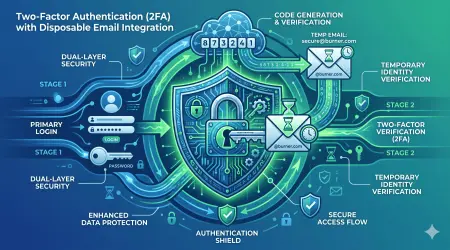
Best Practice 2: Enable Two-Factor Authentication
Why Add 2FA to Temporary Email?
Seems contradictory (temporary + 2FA), but:
- Protects high-value temporary communications
- Prevents unauthorized access if password leaked
- Useful for longer-term secure temp emails
- Adds layer for sensitive projects
How to Implement:
Step 1: Choose 2FA Method
Best: Authenticator app (Google Authenticator, Authy)
Good: Hardware key (YubiKey, Titan Key)
Acceptable: Backup codes
Avoid: SMS (less secure)
Step 2: Set Up Authenticator
1. Open authenticator app
2. Scan QR code from MailDitch
3. Enter 6-digit code to verify
4. Save backup codes securely
5. 2FA now required for access
Step 3: Test It
Log out of secure temp email
Log back in:
  - Enter email address
  - Enter password
  - Enter 2FA code from authenticator
  - Access granted
When to Use 2FA on Temp Email:
- ✅ Handling confidential information
- ✅ Long-term secure communications (weeks/months)
- ✅ High-value transactions or verifications
- ✅ When maximum security is required
- ❌ Ultra-short-term temp emails (10-minute usage)
- ❌ Low-security convenience signups
Best Practice 3: Never Share Password or Access URL
The Vulnerability:
Secure email becomes insecure if you share credentials.
What NOT to Do:
❌ Email password to someone
❌ Share access URL in public forum
❌ Post temporary email and password on social media
❌ Save in unencrypted notes app
❌ Store in browser without master password
❌ Share screen showing password
❌ Text password via unencrypted SMS
Proper Sharing (If Absolutely Necessary):
✅ Use password manager's secure sharing feature
✅ Share via encrypted messaging (Signal, Session)
✅ Use temporary secure link (burns after view)
✅ Communicate password via separate channel
✅ Set up separate secure temp email for recipient
✅ Use shared access features if service provides
Best Approach: Don't share at all. If collaboration is needed, create separate secure temp emails for each party.
Best Practice 4: Use Secure Connections Only
Connection Security Checklist:
Before Accessing Temp Email:
☑ Verify HTTPS in address bar (padlock icon)
☑ Check certificate is valid (click padlock, verify)
☑ Use VPN if on public/untrusted network
☐ NEVER access on HTTP (unencrypted)
☐ Avoid public Wi-Fi without VPN
☑ Use private/incognito mode
☑ Clear browser data after session
Network Security Tiers:
Secure (Green Light):
- Home network with WPA3 encryption
- Mobile data (LTE/5G)
- Trusted work network
- VPN on any network
Questionable (Use VPN):
- Hotel Wi-Fi
- Coffee shop Wi-Fi
- Airport networks
- Friend's network
Dangerous (Never Use):
- Open public Wi-Fi (no password)
- Compromised networks
- "Free Wi-Fi" hotspots
- Unsecured connections
VPN Requirement: When accessing a password-protected temp email:
1. Connect to VPN first
2. Verify VPN is active
3. Then access secure temp email
4. Additional encryption layer
5. IP address masked
6. ISP can't see activity
Best Practice 5: Regular Security Audits
Monthly Security Checklist:
Access Review:
☑ Check login history for suspicious activity
☑ Verify all active sessions are yours
☑ Review devices that have accessed inbox
☑ Revoke old/unrecognized sessions
☑ Check for failed login attempts
Password Maintenance:
☑ Rotate password every 90 days (long-term emails)
☑ Use password manager to track rotations
☑ Update password if any security concern
☑ Never downgrade password strength
☑ Re-test password recovery process
Security Settings Verification:
☑ Confirm encryption still enabled
☑ Verify 2FA still active
☑ Check auto-delete settings
☑ Review privacy preferences
☑ Update if new security features available
Threat Assessment:
☑ Check if temp email appeared in any breaches
☑ Scan for phishing attempts received
☑ Evaluate if temp email still needed
☑ Consider burning if risk increased
☑ Create fresh secure email if compromised
Best Practice 6: Proper Secure Deletion
When Finished with Secure Temp Email:
Step 1: Save What Matters
- Export important messages (encrypted)
- Screenshot critical information
- Download attachments needed
- Document account details if keeping
- Backup to encrypted storage
Step 2: Clear All Data
- Delete all messages
- Remove all attachments
- Clear favorites/saved items
- Delete any filters or rules
- Purge spam/trash folders
Step 3: Delete Account
- Use account deletion feature
- Confirm deletion
- Verify email address released
- Clear browser data
- Remove from password manager
Step 4: Secure Cleanup
- Clear browser cache
- Delete cookies
- Remove autofill entries
- Clear history for temp email URLs
- Log out of any active sessions
Step 5: Verify Deletion
- Attempt to access old email (should fail)
- Verify address can't be recreated immediately
- Check no lingering data
- Confirm complete removal
Common Security Mistakes to Avoid
Learn from these frequent errors:
Mistake 1: Using Weak Passwords
The Error:
Email: [email protected]
Password: password or 123456 or temp123
The Risk:
- Easily guessed by attackers
- Brute force succeeds in seconds
- All security measures bypassed
The Fix:
Email: [email protected]
Password: hK9$mP2@vL5^nQ8&rT3!wY6
Generated and stored in password manager
Mistake 2: Reusing Passwords Across Temp Emails
The Error: Using same password for multiple temp emails.
The Risk:
- One compromised temp email = all compromised
- Can't revoke specific access
- Increased attack surface
The Fix: Unique password for every secure temp email:
Temp Email #1: password_ABC123!@#
Temp Email #2: password_DEF456!@#
Temp Email #3: password_GHI789!@#
Mistake 3: Accessing on Insecure Networks
The Error: Accessing password-protected temp email on open public Wi-Fi without VPN.
The Risk:
- Man-in-the-middle attacks
- Password interception
- Session hijacking
- Traffic analysis
The Fix:
1. Connect to VPN first
2. Verify connection secure
3. Then access temp email
4. Log out when done
5. Disconnect from untrusted network
Mistake 4: Saving Passwords in Browser Without Master Password
The Error: Let browser save password, but no browser master password set.
The Risk:
- Anyone with computer access sees password
- Malware can extract passwords
- No encryption protection
The Fix:
Option A: Use dedicated password manager
Option B: Set browser master password
Option C: Don't save passwords (type each time)
Mistake 5: Not Enabling Available Security Features
The Error: Service offers encryption, 2FA, and zero-knowledge, but user doesn't enable them.
The Risk:
- Reduced security despite available protections
- Unnecessary vulnerability
- False sense of security
The Fix:
☑ Enable all security features
☑ Maximum encryption settings
☑ Activate 2FA
☑ Use zero-knowledge mode
☑ Set aggressive auto-delete
Mistake 6: Sharing Secure Temp Email Too Freely
The Error: Posting temp email address and password publicly or semi-publicly.
The Risk:
- Anyone can access
- Defeats purpose of security
- Can't revoke access easily
The Fix: Keep credentials private:
- Never post publicly
- Share only via encrypted channels
- Better: give others their own secure temp emails
Mistake 7: Keeping Secure Temp Email Active Too Long
The Error: "Temporary" email active for months/years with sensitive data.
The Risk:
- Increased exposure window
- More time for attacks
- Greater impact if compromised
- Defeats "temporary" purpose
The Fix:
Set expiration dates:
- High security needs: 7-30 days max
- Medium security: 30-90 days
- Longer term: Migrate to permanent secure email
Regular review: Burn what's no longer needed
Advanced Security Techniques
Take your secure disposable email to expert level:
Technique 1: Layered Security Approach
Combine Multiple Security Measures:
Layer 1: Service Security
- Choose MailDitch with encryption
- Password-protected inbox
- Zero-knowledge architecture
Layer 2: Connection Security
- Always use VPN
- HTTPS verified
- Secure DNS (DoH/DoT)
Layer 3: Device Security
- Encrypted hard drive
- Updated antivirus
- Firewall enabled
- No keyloggers
Layer 4: Behavioral Security
- Private browsing mode
- Clear data after sessions
- No password sharing
- Regular security audits
Layer 5: Authentication Security
- Strong unique passwords
- 2FA enabled
- Biometric where available
- Hardware keys for critical accounts
Result: Multiple layers mean compromise of one doesn't breach entire system.
Technique 2: Air-Gapped Access for Maximum Security
For Ultra-Sensitive Communications:
Setup:
- Use dedicated device for secure temp email
- Device never used for anything else
- Minimal software installed
- No personal data on device
- Full disk encryption
- Dedicated VPN
Usage:
1. Boot secure device
2. Connect to dedicated VPN
3. Access secure temp email
4. Perform necessary communications
5. Save critical data to encrypted USB
6. Wipe browser data
7. Shut down device
Benefit: Complete isolation from daily computing. Compromise of personal devices doesn't affect secure temp email.
Technique 3: PGP Encryption on Top of Temp Mail
Double Encryption Strategy:
Setup:
- Create secure temp email (Layer 1 encryption)
- Generate PGP key pair
- Share public key with correspondents
- They encrypt messages with your public key
- You decrypt with private key
Process:
Their message:
  → PGP encrypted with your public key
  → Sent to your temp email
  → Temp email's encryption (Layer 1)
  → Stored encrypted on server
  → You access with password
  → Retrieve PGP-encrypted message
  → Decrypt locally with private key
  → Read plaintext
Security:
- Double encryption layers
- Even if temp email compromised, PGP protects content
- Zero-knowledge + end-to-end encryption
- Maximum security possible
Technique 4: Rotating Secure Temp Emails
Proactive Security Through Rotation:
Strategy:
Week 1: Create secure temp email #1
  Use for all communications this week
Week 2: Create secure temp email #2
  Migrate to new email
  Week 1 email becomes receive-only
Week 3: Create secure temp email #3
  Burn email #1 (week old)
  Email #2 becomes receive-only
Week 4: Create secure temp email #4
  Burn email #2
  Continue pattern...
Benefits:
- Limits exposure window
- Compromised email only affects short timeframe
- Regular fresh starts
- Reduces accumulated risk
Implementation:
- Set calendar reminders for rotation
- Use consistent naming: project_week01, project_week02
- Update contacts with new address
- Automate with password manager notes
Technique 5: Secure Collaboration via Shared Encryption
Multiple Parties, One Secure Channel:
Setup:
- Create secure temp email with password
- Generate strong passphrase
- Share passphrase via separate encrypted channel (Signal, etc.)
- All parties access same secure inbox
- Collaborate via saved drafts or messages
Security Considerations:
- Only share with trusted parties
- Use complex passphrase
- Communicate passphrase out-of-band
- Enable 2FA if possible
- Set agreement on when to burn
Use Cases:
- Journalist-source communications
- Whistleblower coordination
- Anonymous group organizing
- Sensitive project collaboration
Better Alternative: Give each party their own secure temp email and use end-to-end encrypted messaging between them.
Comparing Secure Disposable Email Services
Not all services offer the same security. Here's what to look for:
Essential Security Features Checklist
When evaluating temp email services:
Must-Have Features:
☑ Password protection available
☑ HTTPS/TLS encryption
☑ Clear privacy policy
☑ No data logging claims
☑ Automatic message deletion
☑ Minimal personal data collection
Highly Recommended:
☑ End-to-end encryption
☑ Zero-knowledge architecture
☑ Two-factor authentication
☑ Open-source or auditable
☑ Strong jurisdiction (privacy laws)
☑ No third-party trackers
Nice to Have:
☑ Custom domain support
☑ Extended retention options
☑ Attachment encryption
☑ PGP integration
☑ Metadata stripping
☑ Anonymous payment methods
MailDitch Security Advantages
Why MailDitch Leads in Security:
1. Optional Password Protection
- Set passwords on any temp email
- Strong password requirements
- Secure hashing (bcrypt)
- No password recovery (you control access)
2. Encryption at Every Level
- TLS 1.3 in transit
- AES-256 at rest
- Zero-knowledge option available
- End-to-end encryption (Premium)
3. Privacy-First Design
- No registration required (basic)
- Minimal data collection
- No activity logging
- No third-party tracking
- Transparent privacy policy
4. Security Features
- Malware scanning
- Phishing detection
- Attachment scanning
- Spam filtering
- CAPTCHA for bot prevention
5. Flexible Security Levels
- Choose your security level
- Free: Basic security
- Premium: Maximum security features
- Custom: Tailored security requirements
6. Compliance and Trust
- GDPR compliant
- Regular security audits
- Transparent operations
- Responsive to security researchers
- Bug bounty program
Real-World Secure Temp Email Use Cases
Let's see secure disposable email in action:
Use Case 1: Confidential Whistleblowing
Scenario: Employee discovers corporate fraud, wants to report anonymously to journalists.
Security Setup:
1. Use Tor browser for anonymity
2. Generate secure temp email on MailDitch
3. Set complex password (password manager)
4. Enable 2FA with authenticator
5. Enable zero-knowledge encryption
6. Contact journalist with temp email
7. Share password via Signal (separate channel)
8. Exchange encrypted documents
9. Burn temp email after investigation complete
Security Benefits:
- Tor hides IP address
- Password prevents unauthorized access
- 2FA adds authentication layer
- Zero-knowledge means even MailDitch can't read
- Separate password sharing channel
- Complete deletion after use
Protection Achieved:
- Whistleblower identity protected
- Communications encrypted
- No permanent records
- Journalist can verify authenticity
- Legal protections maintained
Use Case 2: Sensitive Medical Research Coordination
Scenario: Medical researchers coordinating across institutions on confidential patient data project.
Security Setup:
Project Email: [email protected]
Password: [Complex 25-character password]
2FA: Enabled for all team members
Encryption: Zero-knowledge mode
Access: Restricted to research team only
Retention: 90 days for project duration
Deletion: Secure wipe after project conclusion
Workflow:
1. Principal investigator creates secure temp email
2. Shares password with team via encrypted channel
3. All communications through this email
4. Files encrypted before emailing
5. Regular password rotations (monthly)
6. Audit trail of access maintained
7. Burned after research published
HIPAA/Privacy Compliance:
- Encrypted communications
- Access controls
- Audit capabilities
- Automatic deletion
- No permanent data storage
- Privacy-preserving collaboration
Use Case 3: Anonymous Activist Organizing
Scenario: Activists organizing peaceful protests in region where dissent is criminalized.
Security Setup:
Organizing Email: [email protected]
Password: Memorable passphrase shared in person
2FA: Backup codes distributed physically
VPN: All members use VPN when accessing
Access: Only from secure devices
Communications: Coordinate actions, share resources
Burn: After event concludes
Operational Security:
- Never access without VPN
- Never from personal devices
- Password shared in person (not digitally)
- No identifying information in emails
- Public computers/internet cafes for access
- Regular email rotation (weekly)
- Immediate burn if compromise suspected
Safety Achieved:
- Identities protected from surveillance
- Communications encrypted
- Can coordinate safely
- Easy to abandon if compromised
- No permanent records of organizing
Use Case 4: Secure Client-Attorney Communications
Scenario: Attorney needs temporary secure channel with client for sensitive case.
Security Setup:
Case Email: [email protected]
Password: [Attorney generates strong password]
Password Sharing: In-person meeting with client
2FA: Both parties set up authenticators
Encryption: End-to-end enabled
Privilege: Attorney-client covered
Duration: Case length + 30 days
Final: Securely deleted with verified destruction
Legal Protection:
- Attorney-client privilege maintained
- Encrypted communications protected
- Third parties can't access
- Compliant with ethical requirements
- Secure destruction documented
Use Case 5: Secure Financial Transaction Coordination
Scenario: High-value transaction requiring confidential communication between parties.
Security Setup:
Transaction Email: [email protected]
Password: Complex (both parties must memorize)
2FA: Hardware keys for both parties
Encryption: Maximum security settings
Verification: Both parties verify each email authenticity
Duration: Transaction period only
Deletion: Immediate after closing
Process:
1. Create secure temp email for transaction
2. Share credentials via separate secure channels
3. Verify all parties' identities
4. Exchange confidential financial details
5. Coordinate transaction elements
6. Confirm completion
7. Securely delete all communications
Protection:
- Financial details encrypted
- No permanent transaction trail
- Protection from industrial espionage
- Compliance with confidentiality agreements
- Clean termination after completion
The Future of Secure Disposable Email
As we progress through 2026 and beyond:
Emerging Security Technologies
Quantum-Resistant Encryption:
- Post-quantum cryptography algorithms
- Protection against future quantum computers
- MailDitch implementing quantum-safe encryption
- Future-proofing security
Blockchain-Based Identity:
- Decentralized identity verification
- Anonymous yet verifiable
- No central point of failure
- User-controlled credentials
AI-Powered Threat Detection:
- Machine learning identifies phishing
- Anomaly detection for compromised accounts
- Behavioral analysis for security alerts
- Automated threat response
Zero-Trust Architecture:
- Never trust, always verify
- Continuous authentication
- Granular access controls
- Minimal privilege principle
Regulatory Evolution
Privacy Laws Strengthening:
- More countries adopting GDPR-style regulations
- Right to encrypted communications
- Restrictions on data collection
- User control over data
Security Requirements:
- Mandatory encryption standards
- Breach notification requirements
- Security audit obligations
- Transparency reporting
User Empowerment:
- Right to anonymous communication
- Protection for privacy tools
- Legal support for encryption
- Restrictions on backdoor demands
Your Secure Disposable Email Action Plan
Ready to implement maximum security? Follow this plan:
Week 1: Foundation
Day 1-2: Learn and Assess
- [ ] Read this guide thoroughly
- [ ] Understand security fundamentals
- [ ] Assess your security needs
- [ ] Identify use cases for secure temp email
Day 3-4: Choose Service and Setup
- [ ] Visit https://mailditch.com
- [ ] Explore security features
- [ ] Decide on free vs Premium
- [ ] Set up password manager if don't have one
Day 5-7: First Secure Email
- [ ] Generate first password-protected temp email
- [ ] Create strong unique password
- [ ] Enable available security features
- [ ] Test access and functionality
Week 2: Implementation
Day 8-10: Security Hardening
- [ ] Enable 2FA on secure temp email
- [ ] Configure encryption settings
- [ ] Set up VPN for access
- [ ] Practice secure access routine
Day 11-14: Practical Usage
- [ ] Use secure temp email for real purpose
- [ ] Monitor for issues
- [ ] Refine security practices
- [ ] Document what works
Week 3-4: Optimization
Day 15-21: Advanced Techniques
- [ ] Implement layered security
- [ ] Try advanced features
- [ ] Set up rotation schedule if needed
- [ ] Share knowledge with trusted contacts
Day 22-30: Integration
- [ ] Make secure temp email part of workflow
- [ ] Replace insecure methods
- [ ] Conduct security audit
- [ ] Plan ongoing security maintenance
Ongoing: Maintenance
Monthly:
- [ ] Rotate passwords on long-term secure emails
- [ ] Review access logs
- [ ] Audit security settings
- [ ] Update security practices
Quarterly:
- [ ] Comprehensive security review
- [ ] Test disaster recovery
- [ ] Evaluate new security features
- [ ] Train others on secure practices
Conclusion: Maximum Security, Complete Privacy
Secure disposable email with password protection isn't just about avoiding spam, it's about taking complete control of your digital communications security.
What you've learned:
✅ Why password protection is essential for temp email security
✅ The multiple layers of security (encryption, zero-knowledge, authentication)
✅ How to create truly secure disposable email addresses
✅ Best practices for maintaining maximum security
✅ Common mistakes and how to avoid them
✅ Advanced techniques for expert-level security
✅ Real-world applications of secure temp email
✅ Future of encrypted communications
Key takeaways:
- Not all temp email is secure, password protection makes a critical difference
- Encryption at every level protects against all threat vectors
- Zero-knowledge architecture ensures even service can't access your data
- Strong passwords + 2FA create an impenetrable authentication
- Layered security provides defense in depth
- Proper deletion ensures no permanent traces
- MailDitch Premium offers maximum security features
Your security journey starts now:
- Visit https://mailditch.com
- Create your first secure disposable email with a password
- Enable all available security features
- Experience truly private communications
Don't compromise on security. Whether you're protecting whistleblowing, coordinating sensitive projects, or simply value your privacy, secure disposable email with password protection is your answer.
👉 Create Your Secure Temp Email Now - Maximum security, complete privacy.
Encrypt everything. Trust no one. Stay secure.
Related Articles
- How to Protect Your Real Email from Spam and Phishing Attacks
- The Ultimate Guide to Free Temporary Email for Verification
- Stay Anonymous Online with Instant Email Address No Registration
- Using Disposable Email for Account Verification: Security Best Practices
Secure Your Communications
Quick Links:
About This Guide: Created by security experts at MailDitch, committed to providing military-grade security for disposable email communications.
Last Updated: January 2026
Share this guide with anyone who needs secure communications. Help build a more secure, private internet.
Questions about secure disposable email? Comment below, and our security experts will help you implement maximum protection!